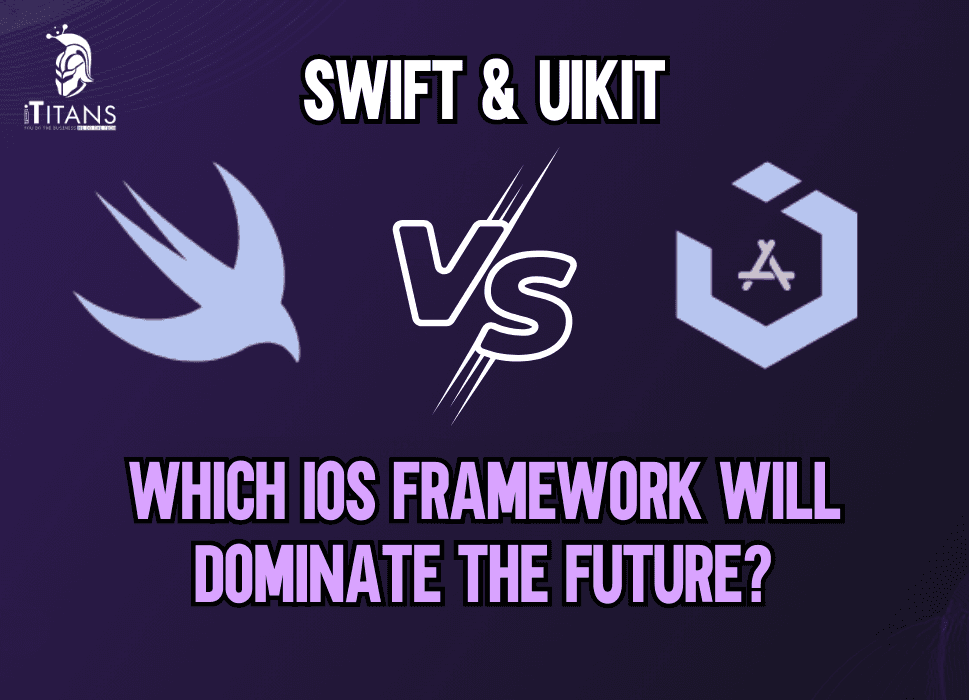
SwiftUI vs UIKit | Which iOS Framework Will Dominate the Future?
Choosing the right development framework is one of the key factors for your project’s success. Quite often, Apple developers face the option to choose between SwiftUI vs UIKit. Both SwiftUI and UIKit offer great development tools and options, but each of them has its strengths and weaknesses.
The key difference between SwiftUI and UIKit is that Swift was released back in 2019 by Apple while UIKit was released before 2010, making Swift relatively newer. To give you broader view of which framework will dominate the future of iOS development, we have written this detailed article on SwiftUI vs UIKit. By comparing the key difference, pros, cons, and compatibility, we are going to discuss which framework is more suitable for development in 2025.
SwiftUI vs UIKit: Overview
What is UIKit?
UIKit is the traditional framework for building iOS applications, introduced with iOS 2. It provides a rich set of components for constructing user interfaces, handling touch interactions, animations, and more. UIKit is mature, widely used, and deeply integrated into Apple’s ecosystem.
Key Features of UIKit
· Mature and Stable: Used by developers for over a decade, offering extensive documentation and community support.
· Fine-Grained Control: Provides advanced customization options and performance optimizations.
· Storyboard and XIBs: Offers a graphical way to design interfaces using Interface Builder.
· Compatible with Objective-C: Supports legacy codebases and seamless integration with Objective-C.
What is SwiftUI?
SwiftUI is a declarative UI framework introduced in 2019. It simplifies UI development by reducing boilerplate code and enabling live previews. Designed for modern iOS development, SwiftUI aims to replace UIKit over time.
Key Features of SwiftUI
· Declarative Syntax: Simplifies UI creation with fewer lines of code.
· Cross-Platform Support: Works across iOS, macOS, watchOS, and tvOS.
· Live Previews: Instantly see UI changes in Xcode without running the app.
· Automatic Dark Mode Support: Adapts to system-wide themes automatically.
· State-Driven UI: Eliminates common bugs related to UI state inconsistencies.
UIKit vs SwiftUI: Features Comparison
Whether you’re a developer or a business looking for a reliable iOS application, it is important to learn about the key difference between UIKit and SwiftUI to make the right choice.
| Feature | UIKit | SwiftUI |
| Learning Curve | Requires more setup | Easier to learn and use |
| Performance | Highly optimized for complex apps | Still catching up in some areas |
| Code Simplicity | More verbose, imperative style | Concise, declarative syntax |
| Customization | Full control over UI elements | Limited customization options |
| Backward Compatibility | Supports older iOS versions | Requires iOS 13+ |
| Cross-Platform Support | iOS-only | Works across Apple platforms |
| Future Proofing | Stable but may be replaced gradually | Apple’s preferred framework for new projects |
Integrating SwiftUI with UIKit
While SwiftUI offers many advantages, it still lacks some advanced functionalities available in UIKit. Apple has provided mechanisms to integrate both frameworks, allowing developers to use the best of both worlds.
Using SwiftUI Inside UIKit
UIKit apps can incorporate SwiftUI views using UIHostingController. This is useful when adding modern SwiftUI components to existing UIKit-based applications.
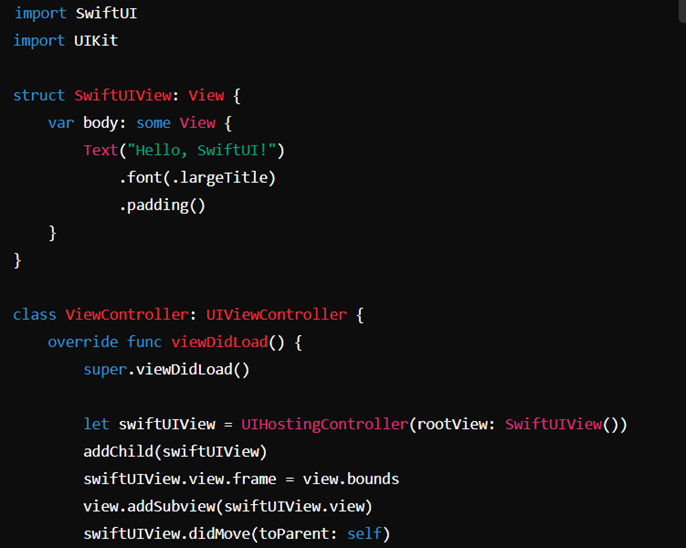
Using UIKit Inside SwiftUI
Conversely, developers can integrate UIKit components within SwiftUI using UIViewControllerRepresentable. This is particularly useful for integrating features that are not yet available in SwiftUI, such as more complex animations or third-party libraries.

This hybrid approach allows businesses to gradually transition from UIKit to SwiftUI without needing a complete rewrite.
Which Framework Will Dominate the Future?
While UIKit is still the industry standard, SwiftUI is the future of iOS development. Apple continues to improve SwiftUI with each new release, adding missing features and optimizing performance. Here are key reasons why SwiftUI will likely dominate in the coming years:
· Apple’s Focus on SwiftUI: Apple is heavily investing in SwiftUI, promoting it as the preferred framework for new apps.
· Cross-Platform Compatibility: SwiftUI enables developers to build apps across iPhone, iPad, Mac, Apple Watch, and Apple TV with shared code.
· Declarative UI Trend: The software industry is moving toward declarative programming, making SwiftUI the natural choice for future development.
· Faster Development Time: SwiftUI’s concise syntax allows developers to build apps more efficiently.
However, UIKit will remain relevant for years to come, especially for complex applications requiring fine-tuned performance and deep customizations.
How iTitans Can Help Businesses with SwiftUI and UIKit
iTitans has served as the leading mobile app development company in the United States with experience of more than 10 years of serving small to large scale businesses. With a team of dedicated mobile app experts, iTitans brings the following services:
SwiftUI Development Services
At iTitans, we utilize SwiftUI to develop mobile apps that are well-optimized and well-prepared for the future. Our team brings the knowledge and experience to build advanced mobile applications with complex features. By combining an interactive user interface and state-of-the-art features, here is what we bring with the iOS development.
· Building modern, lightweight, and responsive SwiftUI apps.
· Optimizing SwiftUI for seamless performance across Apple devices.
· Implementing SwiftUI animations, dark mode, and adaptive layouts.
Hybrid Integration of SwiftUI and UIKit
Do you have an old iOS application built on UIKit or any other framework that requires migration to SwiftUI? iTitans got it covered. Our team helps to bring your current mobile application to the newer framework by making the migration process seamless with the following services.
· Seamlessly integrating SwiftUI within UIKit projects.
· Migrating legacy UIKit apps to SwiftUI with minimal disruption.
· Providing best practices for hybrid development strategies.
Custom iOS App Development
iTitans provides custom mobile app development services for every small to large scale business that really truly represents your business. With an interactive and responsive design, we assure to meet the expectations of our clients while gaining the satisfaction of the targeted audience. Here is what we deliver with our services:
· Tailoring iOS solutions based on business needs.
· Leveraging the latest Apple technologies for performance-driven apps.
· Ensuring compatibility with future iOS versions.
Post Launch Support
To keep your iOS mobile app up and running reliably, iTitans provides you with post-launch support. Post launch is essential to make your mobile app future proof with regular updates, bug fixes, and maintenance support. Here is what iTitans has to offer with the post launch support.
· Bug fixes and maintenance support.
· New features are updated with better versions.
· Resolving errors and downtime.
Consulting and Training
Not sure which framework would be the right for your mobile app? Get a free consultation from iTitans to learn which option would be the best one based on your requirements. Here is what we promise to provide our clients:
· Guiding businesses in choosing the right framework.
· Providing hands-on training for in-house development teams.
· Offering ongoing support and app optimization services.
FAQs
What are the main differences between SwiftUI and UIKit?
SwiftUI is a declarative framework introduced by Apple in 2019, designed for modern, concise, and cross-platform UI development, while UIKit is an imperative framework that has been the backbone of iOS development since 2008. SwiftUI requires less code and offers real-time previews, whereas UIKit provides more control and backward compatibility with older iOS versions.
Is SwiftUI replacing UIKit completely?
No, SwiftUI is not completely replacing UIKit—at least not yet. UIKit is still essential for building complex, production-ready iOS applications due to its maturity, extensive third-party support, and deeper control over UI components. However, Apple is heavily investing in SwiftUI, making it the future of iOS development.
Should I learn UIKit or SwiftUI first as a beginner?
If you’re just starting iOS development, learning SwiftUI is a great choice because it’s simpler, requires less code, and aligns with Apple’s future direction. However, having a foundational understanding of UIKit is still valuable, especially for working on legacy projects and understanding iOS development at a deeper level.
Can I use SwiftUI and UIKit together in the same project?
Yes, you can integrate SwiftUI and UIKit within the same project using UIHostingController (to embed SwiftUI in UIKit) and UIViewControllerRepresentable (to use UIKit components in SwiftUI). This hybrid approach allows developers to leverage the best of both frameworks while transitioning to SwiftUI gradually.
Will SwiftUI dominate the future of iOS development?
SwiftUI is poised to dominate the future of iOS development as Apple continues to improve and expand its capabilities. With better cross-platform support, faster development cycles, and enhanced performance, SwiftUI is becoming the preferred choice for new apps. However, UIKit will likely remain relevant for years, especially for maintaining and updating existing apps.
Conclusion
SwiftUI is undoubtedly the future of iOS development, but UIKit remains a crucial framework for building complex and feature-rich applications. Businesses must carefully assess their needs before choosing between the two.
For companies looking to modernize their applications or start a new iOS project, iTitans offers expert guidance and development services. Whether it’s SwiftUI, UIKit, or a combination of both, our team ensures seamless integration and high-performance solutions. If you’re ready to take your iOS app to the next level, contact iTitans today and let us help you build the perfect iOS experience.