
Offline-First Mobile Apps: When Your Users Need the App to Work Without Signal
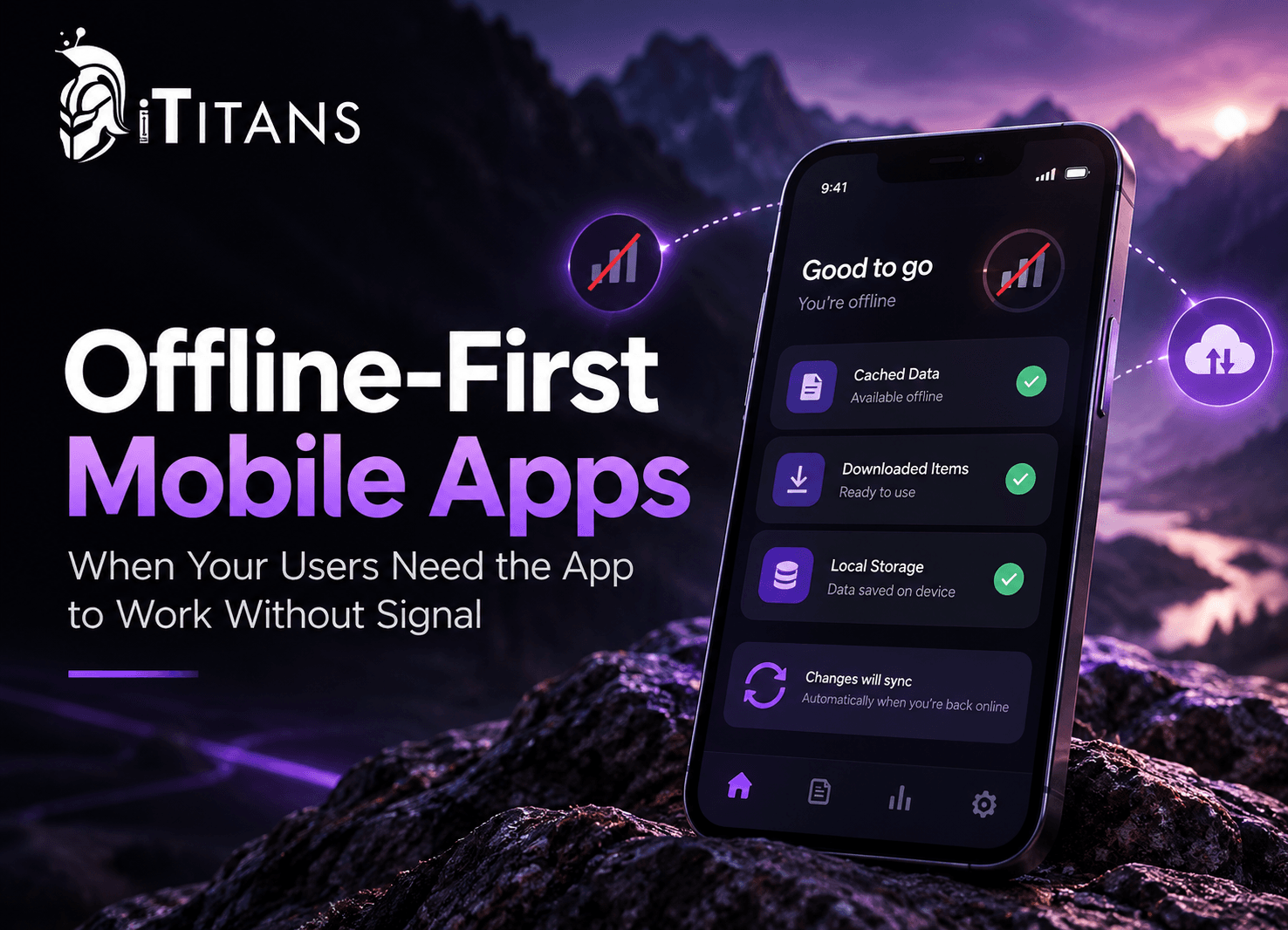
Picture a home inspector in a basement, a nurse charting on a hospital’s lower level, or a warehouse picker deep between steel racks. They tap your app, and the spinner never stops. That one moment costs time, data, and trust.
Offline-first mobile apps store data on the device first and treat the network as optional. Users can read, create, and edit records with zero bars, and the app syncs changes in the background once a connection returns. You need this approach when your users work in basements, warehouses, hospitals, rural areas, or on the move, and lost work means lost revenue.
Below, you’ll learn how offline-first architecture works, who needs it, the sync traps most guides skip, and how an experienced mobile app development team plans the build.
What Are Offline-First Mobile Apps?
An offline-first app treats the phone’s local database as its main source of truth. Every screen reads from on-device storage, never straight from the server. The network becomes a background helper that keeps the device and the cloud in step.
Google’s own Android offline-first guide defines it as an app that handles all of its core features, or at least a critical subset, without internet access. It also says the app should show local data right away instead of waiting on network calls.
That “critical subset” part matters. You don’t need every feature offline. You need the jobs your users simply can’t afford to stop doing.
Offline-First vs. Offline Mode vs. Online-Only
People mix these terms up all the time. Here’s how they actually compare:
| Factor | Online-Only | Offline Mode (Bolt-On) | Offline-First |
|---|---|---|---|
| Source of truth | Server | Server, plus a partial cache | Local database on the device |
| With zero bars | Errors and spinners | Read-only cached screens | Users read, create, and edit |
| Sync approach | None | Refresh on reconnect | Background sync with conflict rules |
| Speed | Depends on the network | Mixed | Instant local reads and saves |
| Upfront effort | Lowest | Moderate | Highest |
| Best fit | Live trading, streaming | News, content, catalogs | Field work, healthcare, logistics, sales |
Many teams start with a bolt-on offline mode and hit its limits fast. If that sounds familiar, a legacy mobile app modernization path can move you toward offline-first without a full rebuild.
Why Connectivity Still Fails Your Users in 2026
US networks keep getting better, and that’s exactly the trap. Leaders look at coverage maps and assume the problem has gone away. The latest numbers tell a more nuanced story:
- Coverage isn’t universal: The FCC’s 2026 broadband report found that mobile 5G at 35/3 Mbps covers almost 95% of US homes and businesses. That still leaves roughly 1 in 20 outside that footprint.
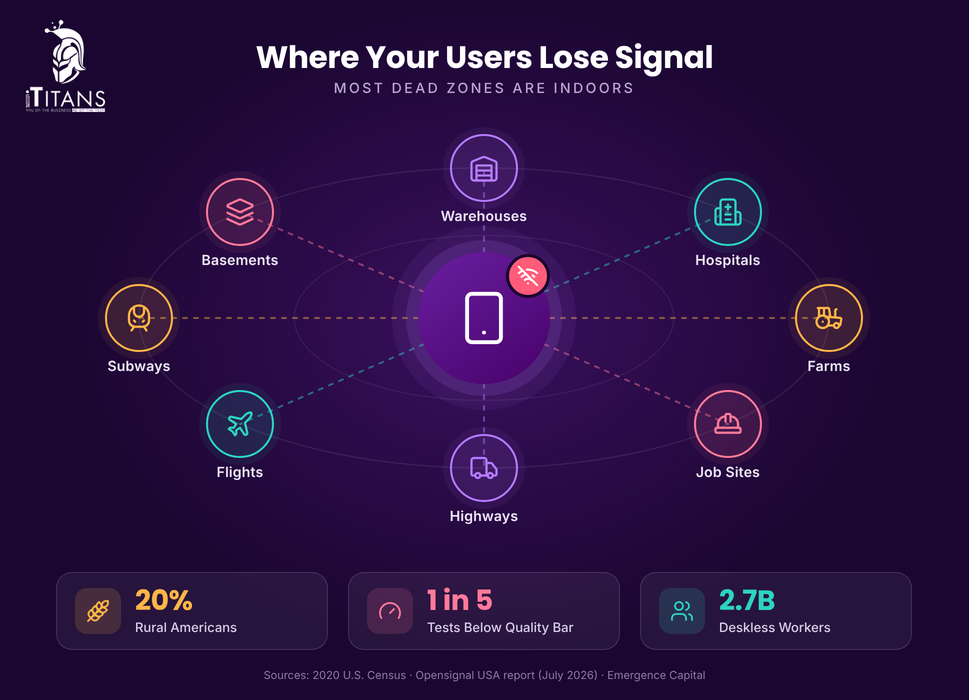
- Dead zones live indoors: Opensignal’s July 2026 USA Mobile Network Experience report shows AT&T, T-Mobile, and Verizon users stay connected 99.2% to 99.6% of the time. Yet it notes the most common dead zones occur indoors.
- Connected doesn’t mean usable: The same report puts Consistent Quality between 79.4% and 82.8%. In other words, roughly one in five tests fell short of what common apps need.
- Rural America is big: The 2020 Census counted 20% of Americans in rural areas.
- Phones carry the load: Pew Research Center reports 91% of US adults own a smartphone, and 16% are smartphone-only internet users with no home broadband.
- Most workers have no desk: Emergence Capital estimates 2.7 billion deskless workers make up 80% of the global workforce.
Put simply, your users rarely sit in “no service” territory. They hit “bad service” moments, and those moments land right when they need your app most.
The “Lie-Fi” Problem Nobody Plans For
A full outage is actually the easy case. The phone knows it’s offline, so your app can react. The harder case is “lie-fi,” where the status bar shows bars or Wi-Fi, but data barely moves.
Think hotel captive portals, packed stadiums, or a warehouse access point clinging to one bar. The OS reports “connected,” your request hangs, and the user stares at a spinner for 30 seconds.
Well-built offline-first mobile apps sidestep this completely. They save locally, update the screen instantly, and let sync retry quietly in the background. The user never waits on the network to finish a task.
Who Needs Offline-First Mobile Apps?
If your users work away from a desk, they probably need apps that work without internet. These US industries feel the pain most:
- Field and home services: HVAC, roofing, solar, and pest control techs work in attics, crawl spaces, and rural lots.
- Warehousing and logistics: Steel racking, freezers, and concrete walls block signal, and drivers cross dead zones daily.
- Healthcare and home health: Clinicians document visits in rural homes and shielded hospital wings. Records need careful sync, as our EMR software development guide explains.
- Construction and inspections: Job sites and new builds often have no Wi-Fi at all.
- Agriculture, energy, and utilities: Farms, pipelines, and wind sites sit far from cell towers.
- Sales reps and distributors: Reps take orders in stockrooms and basements. See how B2B mobile ordering apps cut manual orders.
- Travel, events, and transit: Flights, subways, and crowded venues choke connections.
Signs Your App Should Go Offline-First
- Users capture data (forms, photos, signatures, scans) more than they just read it.
- A lost entry creates compliance, billing, or safety risk.
- Support tickets mention “lost my work” or endless loading.
- Users stay offline for hours or days, not seconds.
- Your app replaces paper, and paper never needed signal.
When Offline-First Is the Wrong Call
Offline-first isn’t free, and some apps don’t need it. Skip it, or limit it, when stale data causes real harm:
- Payments and transfers: Card authorization needs a live answer from the server.
- Real-time markets: Live auctions, trading, and ride dispatch depend on current state.
- Scarce inventory: Two offline users can both “claim” the last seat or unit.
Most real apps land in the middle: offline-first for core work, online-only for a few sensitive actions. That hybrid approach is completely normal.
How Offline-First Architecture Works
Offline-first architecture flips the usual data flow. A typical app goes from screen to server. An offline-first app goes from screen to local database, then through a sync engine to the server.
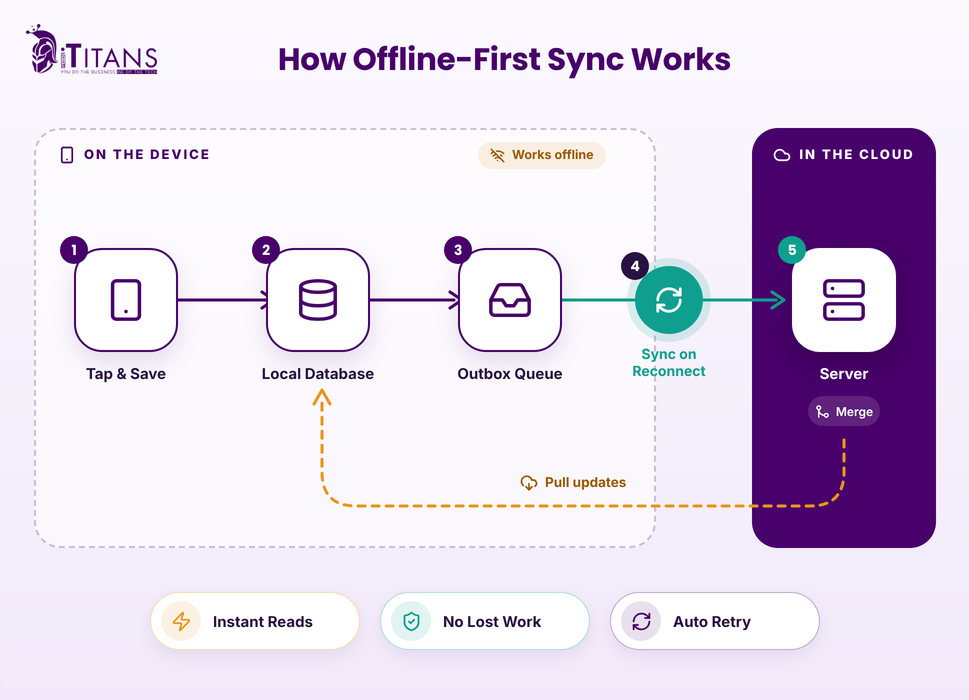
The Local Database Is the Source of Truth
Every screen reads from on-device storage such as SQLite, Room, or Core Data. Reads stay instant, with or without signal.
When fresh data arrives from the server, the app writes it to the local database first. The UI then updates on its own because it observes that local store, not the network.
Pick a Write Strategy for Each Data Type
Google’s Android guidance outlines three write strategies. Smart teams mix them feature by feature:
| Write Strategy | How It Works | Best For |
|---|---|---|
| Online-only | Sends to the server first and fails when offline | Payments, password and account changes |
| Queued | Stores the request and sends it later | Analytics, logs, non-urgent events |
| Lazy (local-first) | Saves locally, then syncs in the background | Orders, inspection reports, notes, anything users can’t lose |
Background Sync Keeps Everything in Step
A sync engine watches an “outbox” of pending changes. When the device reconnects, it pushes local edits, pulls server updates, and retries failures with exponential backoff.
On Android, WorkManager schedules this background sync reliably. On iOS, BGTaskScheduler and background URLSession tasks handle it, but iOS decides exactly when that work runs. So trigger a sync every time the app opens, too.
Sync Only What Each User Needs
Don’t mirror your whole database onto every phone. Scope sync by user, team, territory, or date range. A route driver needs today’s stops, not five years of order history.
Smaller sync scopes mean faster first loads, less storage pressure, and fewer conflicts to resolve later.
Protect Data Stored on the Device
Offline data lives on phones that get lost, stolen, or left in trucks. Treat local storage as a security boundary:
- Encrypt the local database, for example with SQLCipher, and keep keys in the iOS Keychain or Android Keystore.
- Store only the fields each role actually needs offline.
- Support remote wipe through your mobile device management (MDM) tool.
- For healthcare apps, include offline copies of patient data in your HIPAA risk analysis.
Offline Data Sync and Conflict Resolution
This is where offline projects succeed or fail. Two people edit the same record offline. Both reconnect. Now what? Good offline data sync and conflict resolution answer that question before the first line of code.
Common Conflict Resolution Strategies
- Last write wins: The newest change overwrites the rest. It’s simple, but it silently drops data.
- Server wins: The backend’s version always stands. Use it for prices and permissions.
- Field-level merge: Combine edits when users change different fields of the same record.
- CRDTs: Special data types merge automatically, which suits shared notes and checklists.
- Manual review: Flag the clash and let a person decide. Save this for high-stakes records.
Set rules per data type, not one rule for the whole app. A technician’s notes can merge safely. A part’s price should never come from a phone.
6 Sync Traps Most Guides Skip
These issues trip up even experienced teams, and generic guides rarely mention them:
- Device clocks lie. Phones drift and users cross time zones, so “last write wins” based on device timestamps can crown the wrong winner. Use server-assigned version numbers or hybrid logical clocks instead.
- The request worked, but the response vanished. The app retries and creates a duplicate order. Attach a unique idempotency key to every queued write, the same pattern Stripe uses for safe retries.
- “Connected” doesn’t mean online. Don’t preflight requests with a reachability check. Send them with sensible timeouts, or let Apple’s waitsForConnectivity setting hold them until a connection appears.
- Sessions expire offline. A tech who works offline for three days may return with an expired login. Re-authenticate without clearing the outbox, or that work disappears.
- Deletes need tombstones. If you simply remove a row locally, the next sync can bring it right back. Mark records as deleted and sync that marker.
- App updates can strand old data. A new release may change the database schema while unsynced records still sit in the old format. Migrations must carry the outbox safely, which is one reason post-launch app maintenance costs deserve a real budget line.
Choosing Your Offline-First Tech Stack
Your stack decides how much sync logic you write yourself. Here’s a quick look at popular options in 2026:
| Option | Platforms | Strengths | Watch Out For |
|---|---|---|---|
| Room (SQLite) | Android | Google’s recommended local store, full control | You build sync and conflict rules yourself |
| SwiftData / Core Data | iOS, iPadOS, macOS | Native speed, CloudKit integration | CloudKit sync only reaches Apple devices |
| SQLite libraries | Flutter, React Native | One local store across platforms | Sync layer is on you or a vendor |
| Cloud Firestore | Android, iOS, web, Flutter | Built-in offline cache and write queue | Offline persistence is off by default on web |
| Couchbase Lite | iOS, Android, desktop | Revision-based sync, peer-to-peer options | Enterprise licensing costs |
| PowerSync | Flutter, React Native, Kotlin, Swift, web | Syncs on-device SQLite with Postgres and other backends | Adds a vendor dependency |
Firebase’s offline data documentation confirms persistence is on by default for Android and Apple platforms but off for the web. Choosing between frameworks? Our Flutter vs React Native comparison breaks down the tradeoffs.
A Real Lesson in Vendor Lock-In
In September 2024, MongoDB deprecated Atlas Device Sync, the sync layer behind many Realm apps. According to MongoDB’s deprecation notice, it reached end-of-life on September 30, 2025. Teams had about a year to rebuild sync.
The takeaway? Keep sync logic behind your own interface, and own your data model. If a vendor exits, you swap the engine, not the whole app.
Should You Build a PWA Instead?
A progressive web app can work offline using service workers and IndexedDB. That’s fine for light use, but think twice for critical field data.
Per WebKit’s storage policy, Safari treats web storage as “best-effort” by default and can evict it under storage pressure or inactivity. For teams that go days between syncs, a native or cross-platform app is the safer bet.
Designing Offline UX That Users Trust
Great sync means nothing if users don’t trust it. Thoughtful UI/UX design makes the app’s state obvious at a glance:
- Show sync status: Add a small synced, pending, or failed badge to each record.
- Never block on the network: Save instantly and confirm with “Saved on this device.”
- Use optimistic updates: Reflect changes right away, then reconcile quietly.
- Label online-only actions: Grey out payments with a clear reason, not a cryptic error.
- Offer a “Sync now” button: Field users love having control.
- Warn before logout: Many apps wipe the local database on sign-out, and unsynced work goes with it.
Handle Photos and Files Separately
Photos, signatures, and PDFs can swamp a sync queue. Keep them in their own upload queue so a 12 MB photo never blocks a 2 KB form.
Compress images on the device, upload in resumable chunks, and let users choose Wi-Fi-only uploads for big files. Show a clear count of pending files so nobody resets the phone too early.
How to Plan Offline-First App Development in 5 Steps
Good offline-first app development starts long before anyone writes sync code. Follow this order:
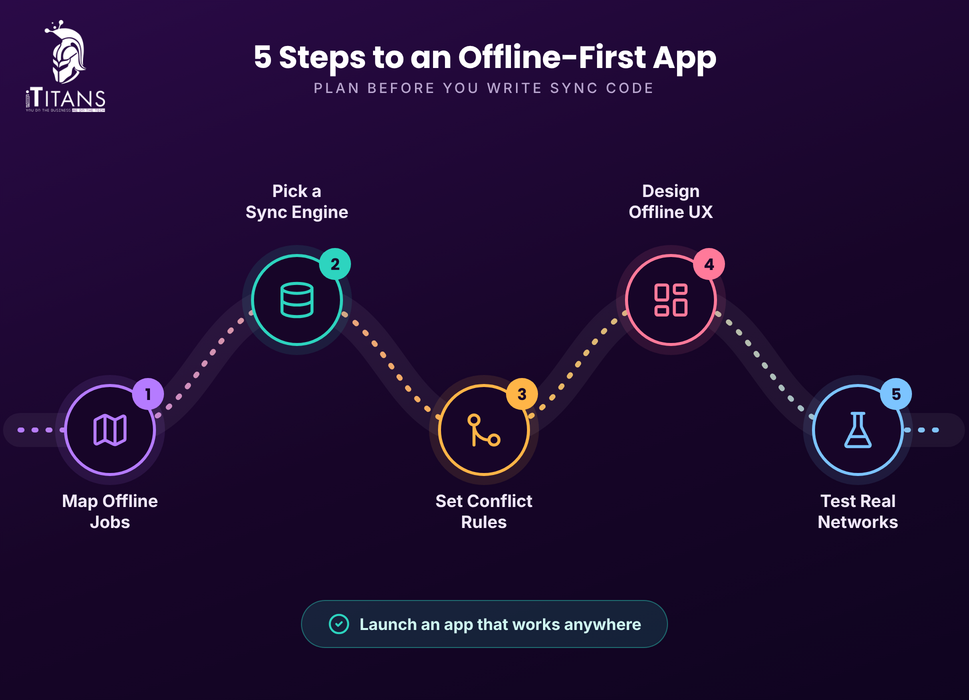
- Map the offline jobs. List the tasks users must finish with zero bars, and for how long: minutes, hours, or days. Starting lean with an MVP mobile app helps you validate this fast.
- Choose a source of truth and sync engine. Decide early between custom sync, a managed service, or a sync vendor.
- Write conflict rules per data type. Document who wins for every entity before coding starts.
- Design the offline UX. Plan status badges, error states, and storage limits for photos and files.
- Test on real bad networks. Airplane mode alone won’t catch the bugs that matter.
How to Test an Offline-First App
- Throttle traffic with Apple’s Network Link Conditioner and the Android Emulator’s network settings.
- Kill the app mid-sync and confirm nothing duplicates or disappears.
- Edit one record on two offline devices, then reconnect both.
- Fill the device storage and watch how the app behaves.
- Walk real dead zones: basements, elevators, and parking garages.
Automate the repeatable scenarios and save manual runs for real-world walks. Our look at manual QA vs automated testing shows where each one pays off.
How iTitans Helps You Build Offline-First Mobile Apps
iTitans is a Frisco, Texas-based tech company that builds mobile apps, web platforms, and custom software for US businesses. Its motto says it all: you do the business, we do the tech. Here’s how that applies when your app must work without signal.
Native iOS and Android Apps
The team builds iOS apps with Swift and Core Data and Android apps with Kotlin and SQLite. A native stack gives you fine control over local storage, background work, and battery use.
Cross-Platform Apps With Flutter and React Native
Need one codebase for both platforms? iTitans’ cross-platform app development team uses Flutter and React Native to ship faster while keeping a single, shared data layer.
Software for Field and Warehouse Teams
iTitans offers customizable home service software and warehouse management systems covering scheduling, job tracking, barcode scanning, and inventory. These field-heavy workflows benefit most from local storage and dependable sync.
Cloud Backends Built to Handle Sync
When hundreds of devices reconnect at once, your sync server takes the hit. iTitans’ DevOps services cover CI/CD automation, AWS, Azure, and Google Cloud setups, Kubernetes, and real-time monitoring, so your backend stays steady when the outboxes empty.
QA and Post-Launch Support
Offline bugs hide in edge cases. iTitans’ software quality assurance covers functional, usability, and device compatibility testing, while its app maintenance and support team handles updates, monitoring, and new features after launch.
Build Offline-First Mobile Apps Your Users Can Count On
Signal will always drop somewhere: a basement, a freezer aisle, a rural driveway, a packed stadium. Offline-first mobile apps turn those moments into non-events. They read from a local database, save every action instantly, and let background sync handle the network when it returns.
To get there, map the jobs users must finish offline, choose a sync approach you control, and set conflict rules for each data type. Then design clear sync status into the UX and test on real bad networks. Watch for hidden traps like clock drift, duplicate retries, and logout data loss.
Ready to build an app your team can trust anywhere? Talk to iTitans about your offline-first app development project, and get a plan shaped around how your users actually work.
FAQs
What is an offline-first mobile app?
An offline-first mobile app stores and reads data on the device first, so users keep working without internet. It syncs changes with the server automatically once a connection returns.
How do offline apps sync data when the internet comes back?
The app keeps a queue of pending changes. On reconnect, a sync engine sends local edits, pulls server updates, resolves conflicts, and retries any failures automatically.
Which database is best for offline-first apps?
SQLite-based stores lead the pack. Android teams use Room, iOS teams use SwiftData or Core Data, and cross-platform teams pick SQLite libraries, Firestore, Couchbase Lite, or PowerSync.
Can Flutter and React Native apps work offline?
Yes. Both frameworks support local databases and background sync, so they can deliver full offline-first experiences. Your sync engine and conflict rules matter more than the framework.
Does offline-first app development cost more?
Usually, yes, upfront. Sync logic, conflict handling, and extra testing add scope. Retrofitting offline support into a finished app, however, typically costs far more than planning it from day one.