Why Apps Get Rejected From the App Store and How to Pass Review First Time
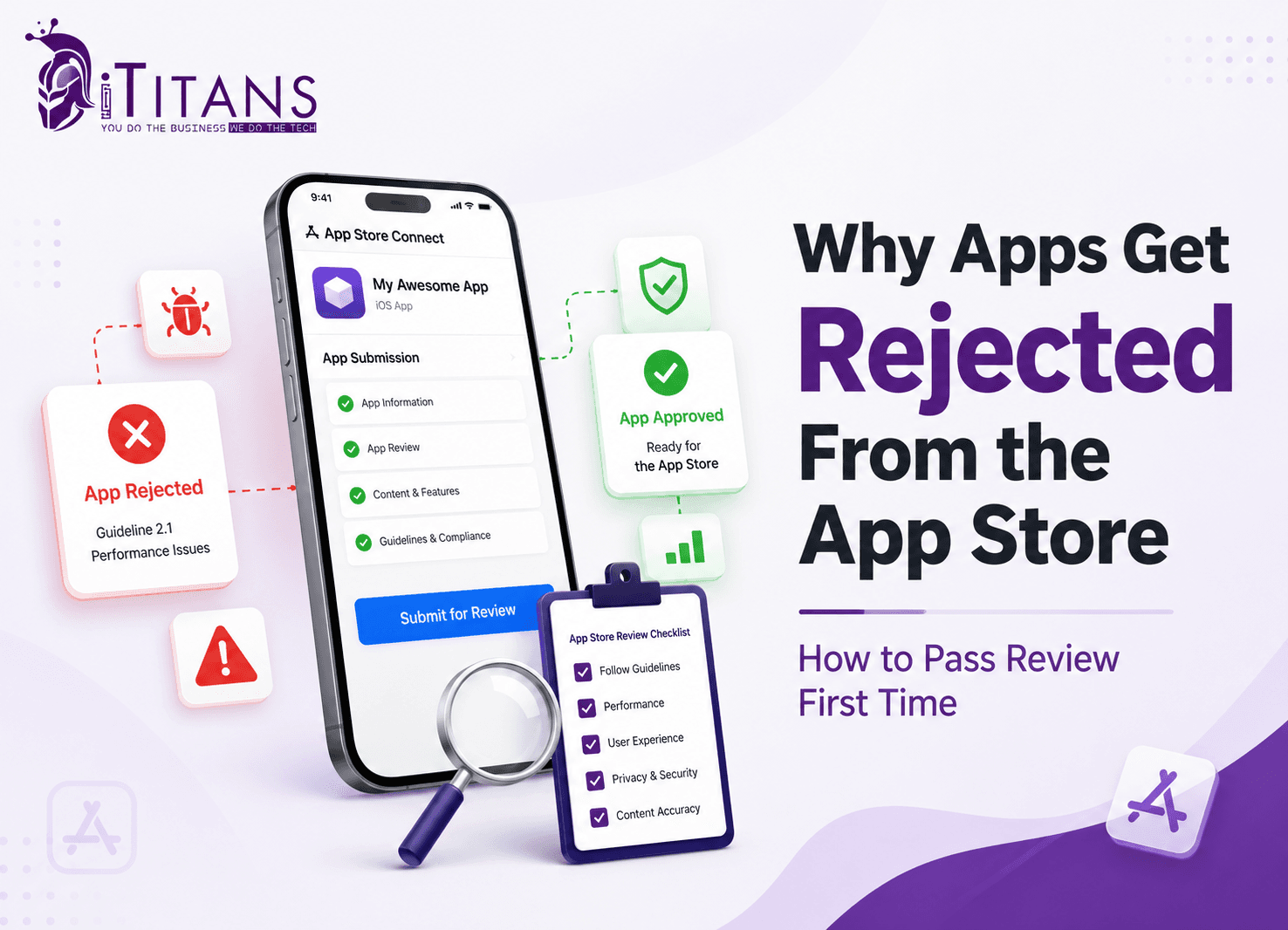
Getting a rejection notice from App Store Connect never feels good, especially after months of work. Here’s the good news: almost every developer sees this screen at least once, and it rarely means starting over.
App Store rejection reasons usually come down to a handful of predictable problems: crashes, incomplete features, unclear privacy disclosures, broken demo accounts, misleading screenshots, and missed payment rules. In 2024, Apple rejected 1.93 million of the 7.77 million app submissions it reviewed, nearly one in four, and most rejected apps get approved within a day or two once the flagged issue is fixed.
In this blog, we are going to discuss why apps get rejected, what Apple’s reviewers actually check, and how to build an app that clears review the first time.
How Common Is App Store Rejection, Really?
App Store rejection is far more common than most developers assume. Apple’s 2024 App Store Transparency Report gives the clearest picture available, and the numbers are worth knowing before you panic about your own rejection email.
Apple’s review team processed 7,771,599 app submissions in 2024 and rejected 1,931,400 of them. Industry data on first-time submissions puts the rejection rate for brand-new apps even higher, with roughly four in ten getting turned away on the first attempt. The silver lining: 295,109 of those rejected apps were approved after developers fixed the flagged issue and resubmitted.
Performance problems accounted for more rejections than any other category, at 1,235,471 citations, close to two-thirds of all App Store rejection reasons that year. Legal concerns followed at 445,696, and design issues caused 378,300 rejections. Business and safety violations rounded out the top five, in that order.
| Metric (2024) | Figure |
|---|---|
| App submissions reviewed | 7,771,599 |
| App submissions rejected | 1,931,400 (about 25%) |
| Rejected apps later approved after a fix | 295,109 |
| Performance-related rejections | 1,235,471 |
| Legal-related rejections | 445,696 |
| Design-related rejections | 378,300 |
| Apps removed post-launch | 82,509 |
Source: Apple’s 2024 App Store Transparency Report, as reported by MacRumors.
Apple’s Five App Review Pillars You Need to Know
Apple organizes every review around five categories: Safety, Performance, Business, Design, and Legal. Knowing this framework helps you audit your own app before submission instead of guessing after a rejection lands.
Each pillar maps to specific numbered guidelines inside the official App Store Review Guidelines. A rejection notice almost always cites one of these numbers, so understanding what each pillar checks turns a cryptic email into a clear next step.
| Pillar | What Apple Checks | Example Guideline |
|---|---|---|
| Safety | User protection, content moderation, data handling | 1.2, 5.1.1 |
| Performance | Crashes, app completeness, accurate metadata | 2.1, 2.3 |
| Business | Payments, subscriptions, advertising | 3.1.1, 3.2 |
| Design | Human Interface Guidelines, layout, usability | 4.0, 4.2 |
| Legal | Privacy laws, intellectual property, licensing | 5.1, 5.2 |
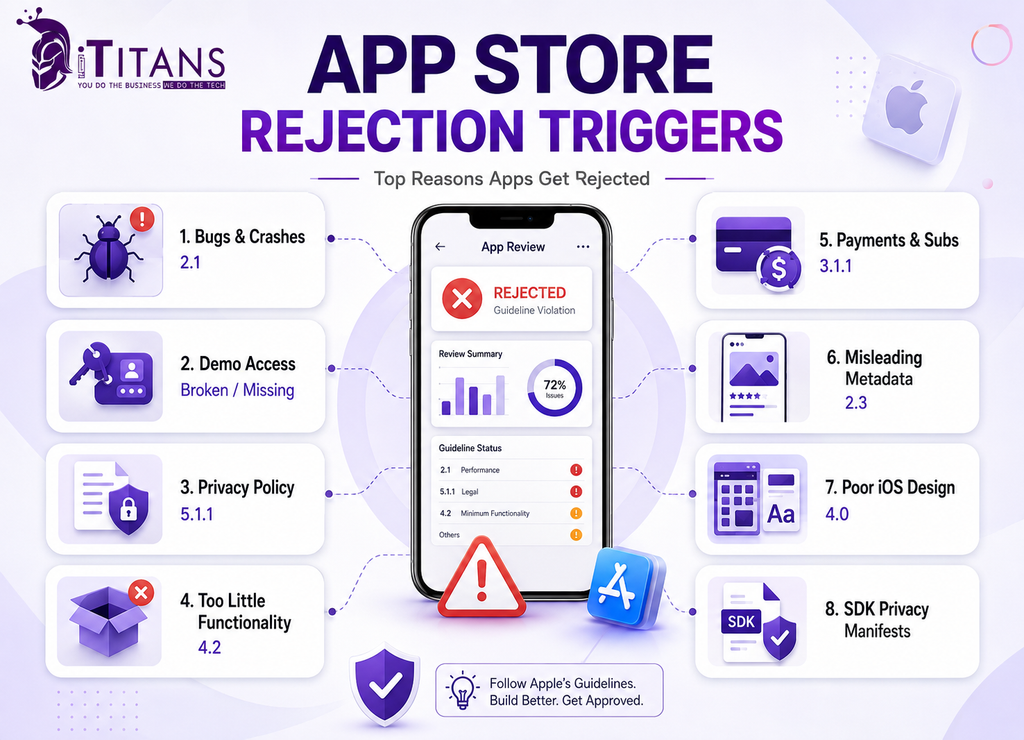
Top Reasons Apps Get Rejected From the App Store
These iOS app rejection triggers show up again and again in App Store Connect, ranked roughly by how often App Review cites them.
1. Bugs, Crashes, and Incomplete Features (Guideline 2.1)
Guideline 2.1, App Completeness, causes more rejections than any other single rule. Reviewers open your app and tap through the core flows within minutes. If it crashes, freezes, or shows a placeholder screen, the review stops right there.
- Leftover “Lorem Ipsum” text or “coming soon” placeholders
- Broken links, dead buttons, or empty screens
- A build pointed at a staging or test server instead of production
Test every user flow on a real device before you submit, not just a simulator. A thorough quality assurance pass, the kind our SQA team runs before every client submission, catches the issues a rushed final check misses.
2. Broken or Missing Demo Account Access
If your app requires a login, Apple needs a working demo account to test it. Reviewers do not create test accounts themselves, and they will not guess a password.
Add full credentials, including any two-factor codes or one-time passcodes, in the App Review Information section of App Store Connect. If your login flow uses SMS verification, provide a bypass or a static test code, since reviewers cannot receive texts sent to your test number.
A missing or expired demo account is one of the fastest ways to trigger a “2.1 Information Needed” message and lose two full review cycles.
3. Unclear or Missing Privacy Policy (Guideline 5.1.1)
Every app needs a working privacy policy link, both inside App Store Connect metadata and inside the app itself. A broken page, a login wall, or a generic company page that never mentions data collection gets flagged fast.
Your privacy policy has to match your App Privacy label exactly. If your metadata says you collect location data but your app also quietly pulls contacts, that mismatch alone triggers rejection.
Since June 2022, apps that let users create an account must also let them delete it from inside the app, with a visible option in settings, not just an email request.
4. Apps That Don’t Do Enough on Their Own (Guideline 4.2)
If your app is really a website wrapped in a browser view, or it only opens a phone number or a single web form, Apple will reject it for minimum functionality. The App Store is not meant to host thin repackaged websites.
Apple wants to see things a mobile browser genuinely cannot do well: push notifications tied to real events, offline access, camera or sensor integration, or real native performance gains.
This is where working with an experienced cross-platform app development team pays off, since native functionality has to be built into the architecture from day one, not bolted on after a rejection.
5. Payment and Subscription Violations (Guideline 3.1.1)
Any digital content unlocked inside your app, subscriptions, extra credits, premium tiers, has to use Apple’s in-app purchase system. Linking out to an external checkout page for digital goods is one of the fastest App Store rejection reasons on this list.
Subscription pricing also needs to be fully visible before checkout, with clear renewal terms and an easy cancellation path. Hidden pricing or confusing upgrade flows draw scrutiny under the Business guidelines.
Physical goods and services consumed outside the app, like a rideshare or a food order, are exempt from this rule.
6. Misleading Metadata, Screenshots, or App Description (Guideline 2.3)
Your App Store listing has to match what the app actually does. Screenshots showing features that do not exist yet, keyword-stuffed titles, or a description that oversells functionality all count as misleading metadata.
Reviewers compare your screenshots against the live build in real time. If the interface looks different, uses placeholder data, or hides content behind a paywall you never mention, expect a rejection with a request to update your assets first.
7. Design That Ignores Apple’s Human Interface Guidelines (Guideline 4.0)
Apple cares about consistency across the App Store, not just whether your app works. Non-standard navigation, tiny tap targets, low-contrast text, and interface elements that look copied from a different platform all raise flags under the Design guidelines.
Overlapping content, ignored safe areas, and layouts that break on newer iPhone screen sizes are common triggers too, since Apple checks your app across multiple device sizes during review.
Good design is not only about passing review. Apps built around a solid app design process, with Apple’s interface standards baked in from the wireframe stage, tend to see stronger engagement once they launch.
8. Third-Party SDKs Without Privacy Manifests
You can get rejected for code you did not even write. Apple now requires every third-party SDK, analytics tools, ad networks, crash reporters, to include a privacy manifest disclosing what data it collects and why.
If an embedded SDK tracks users without disclosure, App Review flags your entire submission, not just the offending library. Audit every SDK before each submission and remove or replace anything that has not been updated to comply.
This is a newer App Store rejection reason, and it catches experienced teams just as often as first-time developers.
How Long Does App Store Review Actually Take?
Once you understand App Store rejection reasons, the next question is how long you wait to find out if you passed. Apple states that, on average, 50 percent of apps are reviewed within 24 hours and 90 percent within 48 hours, according to its own App Review FAQ.
That average resets every time you get rejected. A fresh rejection sends your resubmission back into the review queue, which can add another day or two to your launch timeline. Apps in regulated categories, health, finance, and anything aimed at kids, often take longer because reviewers apply extra scrutiny.
Expedited review exists for genuine emergencies, like a crash affecting live users or a broken payment flow, but Apple grants a limited number of these per developer account, and abuse leads to slower reviews going forward.
| Scenario | Typical Review Time |
|---|---|
| Standard new app submission | 24 to 48 hours |
| Minor app update | Often faster than a new app |
| Resubmission after rejection | Restarts the full review queue |
| Approved expedited review | 6 to 24 hours |
| Regulated categories (health, finance, kids) | Add 1 to 3 extra days |
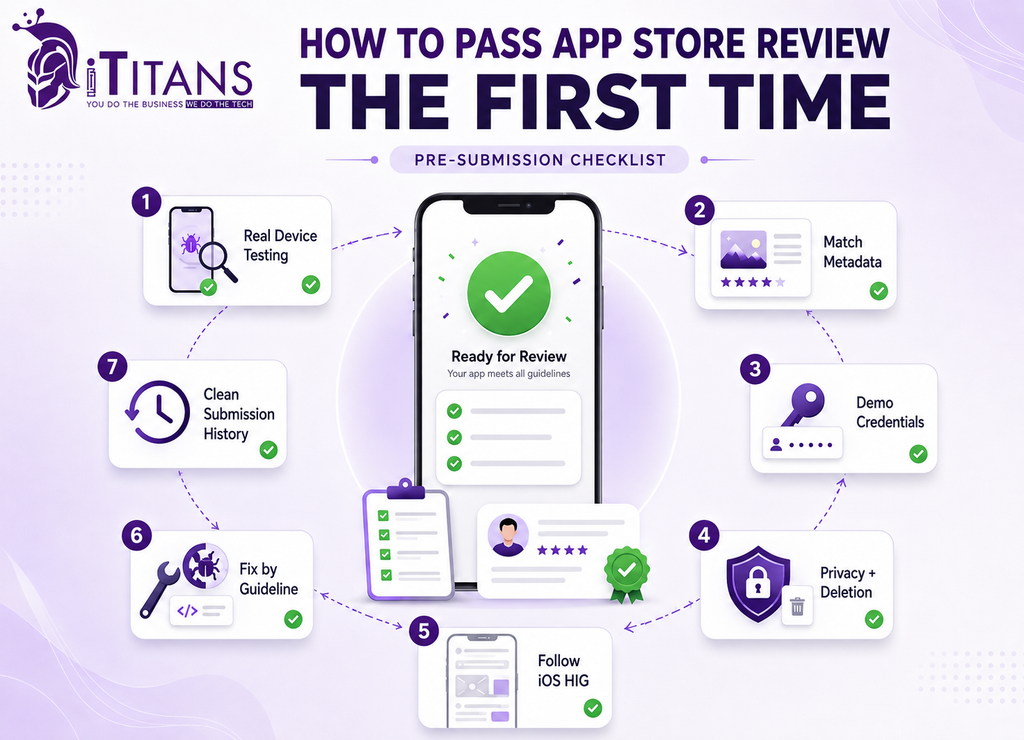
How to Pass App Store Review the First Time
Passing App Store review on the first try is less about luck and more about closing every gap before a reviewer opens your build. Here is the pre-submission process that consistently works.
- Test on real devices, not just simulators. Run your app through TestFlight with external testers across a range of iPhone models and iOS versions, since simulators miss camera bugs and permission prompts that show up on real hardware.
- Complete every metadata field. Your title, subtitle, description, screenshots, and keywords all need to match the live build, and generic “what’s new” notes like “bug fixes” for a major update raise flags.
- Provide working demo credentials. Add a full walkthrough in the App Review Information notes, including any two-factor codes, so a reviewer can access every feature without contacting you.
- Match your privacy policy to your App Privacy label. Review both side by side before you submit, and make sure account deletion is available directly inside the app.
- Follow Apple’s Human Interface Guidelines from the design stage. A professional iOS app development process bakes these standards into the wireframes long before a line of code gets written, avoiding expensive redesigns later.
- Read the actual rejection message before reacting. Apple’s notices cite a specific guideline and describe what the reviewer observed, so fix only that issue and reply in the Resolution Center with a clear explanation of what changed.
- Build a submission history you can trust. Apple’s review process weighs your developer account’s track record: accounts with a history of clean, compliant submissions tend to see faster, lighter-touch reviews over time, while accounts with repeated rejections face closer scrutiny even on apps that meet every guideline.
App Store vs Google Play: How Rejection Differs
Apple’s App Store rejection reasons and Google Play’s overlap on the basics. Crashes, misleading metadata, and privacy violations trip up both platforms, but the App Store approval process is stricter about design consistency and relies more heavily on manual review.
Every iOS submission goes through a human reviewer, while Google Play leans more on automated scanning, especially for updates. That is part of why Apple’s average review time runs 24 to 48 hours, while Google Play updates can clear in a few hours but brand-new Android apps can take several days.
How iTitans Helps You Build an App Store-Ready App
Avoiding App Store rejection reasons gets a lot easier when compliance is built into development from day one instead of patched in during a rushed final week. This is where a specialized team makes the difference between a smooth launch and a frustrating loop of resubmissions.
iTitans works as an end-to-end mobile app development partner for businesses across the United States, building iOS, Android, and hybrid apps that meet Apple’s Safety, Performance, Business, Design, and Legal requirements from the first sprint. The team handles everything from Apple-compliant app design to structured quality checks before every submission, catching the crashes and incomplete flows that cause the majority of App Store rejection reasons.
For teams that need extra hands during a crunch, iTitans also offers dedicated iOS developers who can join an existing project and manage the submission process directly. After launch, ongoing app maintenance and support keeps your app compliant as Apple updates its guidelines throughout the year.
App Store rejection reasons are rarely mysterious once you know where to look. Most rejections trace back to a small set of predictable issues: unfinished features, crashes, unclear privacy disclosures, broken demo accounts, misleading screenshots, and payment rules that got missed. Apple rejected nearly one in four submissions in 2024, but the majority of flagged apps got approved after a quick, targeted fix.
The developers who pass App Store review on the first try treat Apple’s five pillars, Safety, Performance, Business, Design, and Legal, as a pre-submission checklist rather than a mystery to solve after the fact. Test on real devices, complete every metadata field, provide working demo credentials, and match your privacy policy to your actual data practices.
Get those fundamentals right, and your next submission has a real shot at clearing review before your coffee gets cold. If your last submission got rejected, or you would rather get it right the first time, contact iTitans to talk through your project.
Frequently Asked Questions
Why does Apple reject apps from the App Store?
Apple rejects apps mainly for crashes, incomplete features, unclear privacy practices, misleading metadata, and payment rule violations. Guideline 2.1, App Completeness, causes the largest share of App Store rejection reasons.
How long does it take to fix a rejected app?
Most fixes take a few hours to a day. Simple issues like broken links or missing demo credentials get resolved same day; deeper functionality problems can take longer to rebuild and retest.
Can you resubmit a rejected app unlimited times?
Yes, there is no limit on resubmissions. Each resubmission restarts the review queue, so fixing every flagged issue in one pass saves more time than several partial fixes.
What is the most common App Store rejection reason?
Performance issues under Guideline 2.1 are the most common App Store rejection reason, causing over 1.2 million rejections in 2024, more than any other category.
Can you appeal an App Store rejection?
Yes. Developers can respond in the Resolution Center or file a formal appeal through the App Review Board if they believe a guideline was misapplied.
Does a rejected app lose its place in the review queue?
Yes, a rejected and resubmitted app generally re-enters the queue from the start, which is why fixing every flagged issue in one pass matters most.