
Website Maintenance Cost for Businesses: What Should You Budget in 2026?
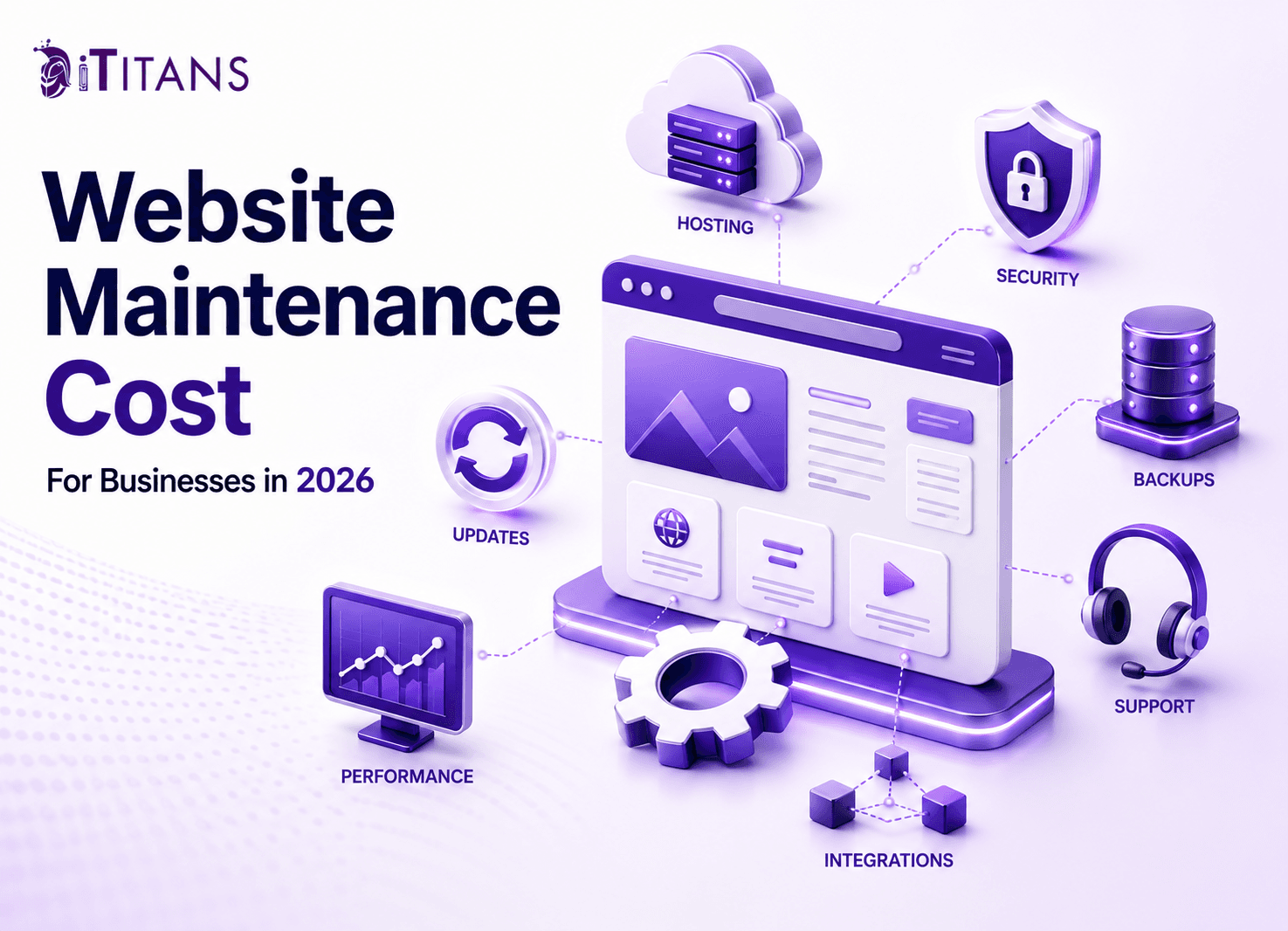
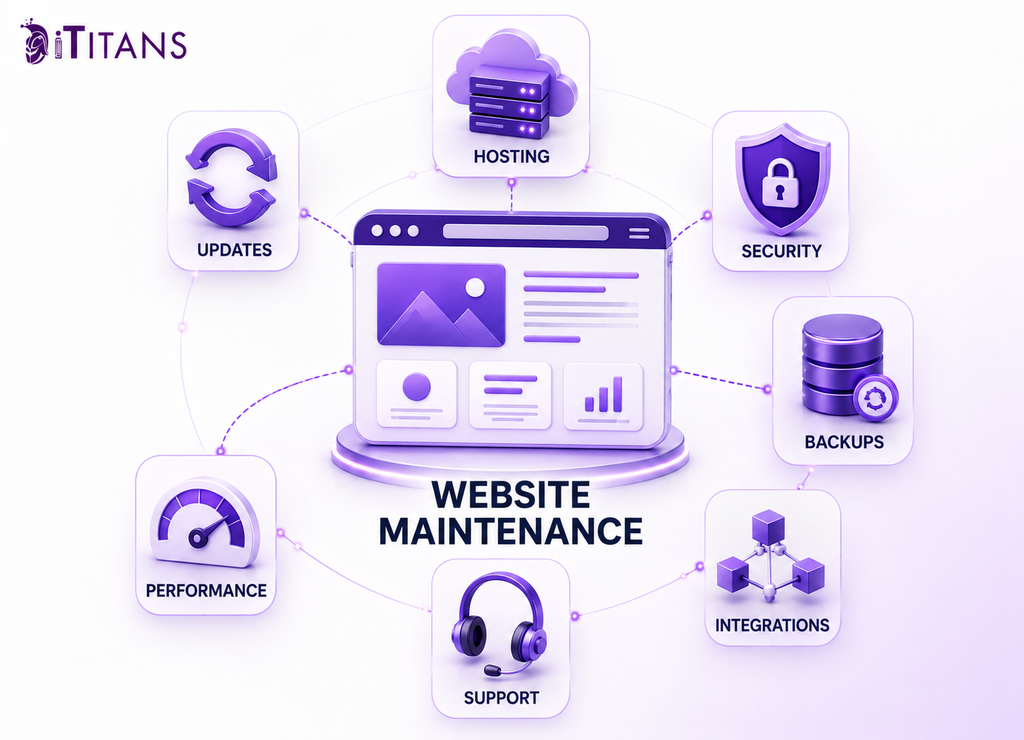
For a business website, the initial development bill is only part of the cost. Ongoing expenses can come from hosting, domain renewals, CMS and plugin updates, security monitoring, content changes, technical support, performance work, and third-party integrations. That is why website maintenance cost should be treated as an operating expense rather than a one-time technical fee.
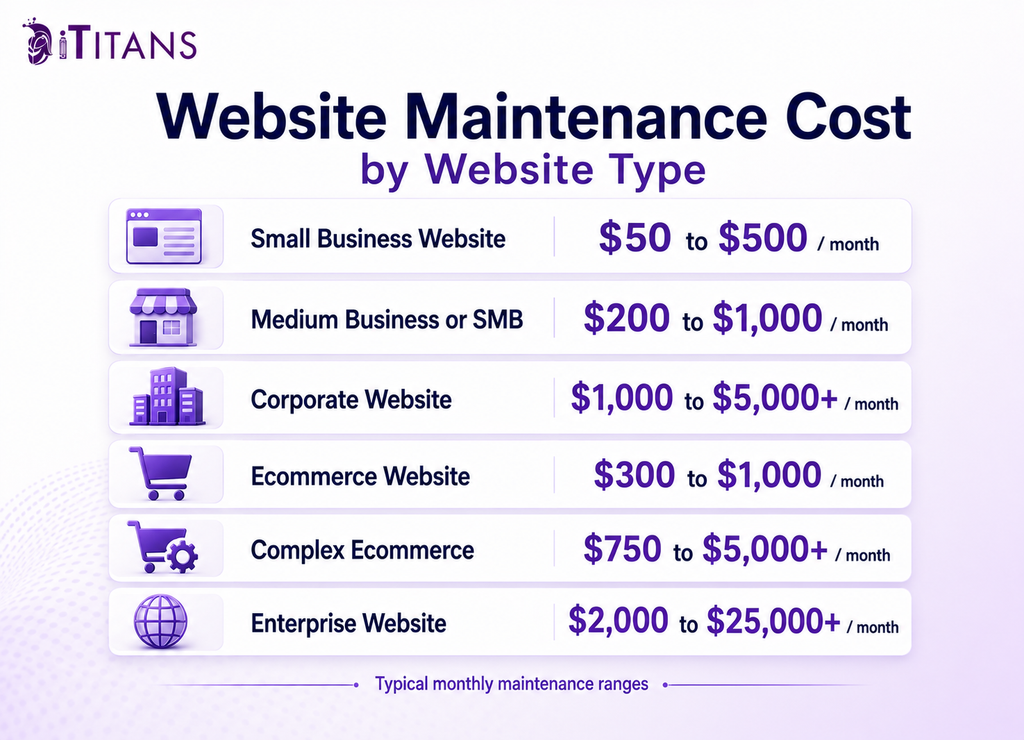
Current 2026 market figures show just how much the cost of website maintenance can vary. Small-to-medium business websites are commonly placed around $50 to $500 per month, while corporate websites can reach $1,000 to $5,000 or more.
Ecommerce websites can fall around $300 to $1,000 per month in some pricing models, while complex enterprise websites can reach $2,000 to $25,000 or more. These aren’t universal prices because the underlying maintenance scope can be completely different from one business to another.
For founders and CTOs, that distinction matters. The right budget is not the lowest number you can find online. It is the amount required to keep the website secure, available, technically compatible, and capable of supporting the business without repeatedly turning routine problems into emergency development work.
How Much Does Website Maintenance Cost for a Business?
How much does website maintenance cost depends primarily on what has to be maintained rather than how many pages the website contains.
For a small-to-medium business website, the cost for website maintenance commonly falls between $50 and $500 per month. Corporate websites can range from $1,000 to $5,000 or more per month, while enterprise websites can reach $2,000 to $25,000 or more when infrastructure, security, integrations, support, and ongoing technical work become significant.
Ecommerce sits in a particularly broad range. Current pricing guides place many ecommerce sites between $300 and $1,000 per month, while more complex ecommerce maintenance plans can reach $750 to $5,000 or more when security, product management, platform fees, infrastructure, and development support are included.
These differences illustrate an important budgeting principle: there is no single industry-standard maintenance fee that accurately prices every B2B website. When comparing website cost and maintenance, businesses need to consider the technology stack, level of support, integrations, security requirements, and expected maintenance workload.
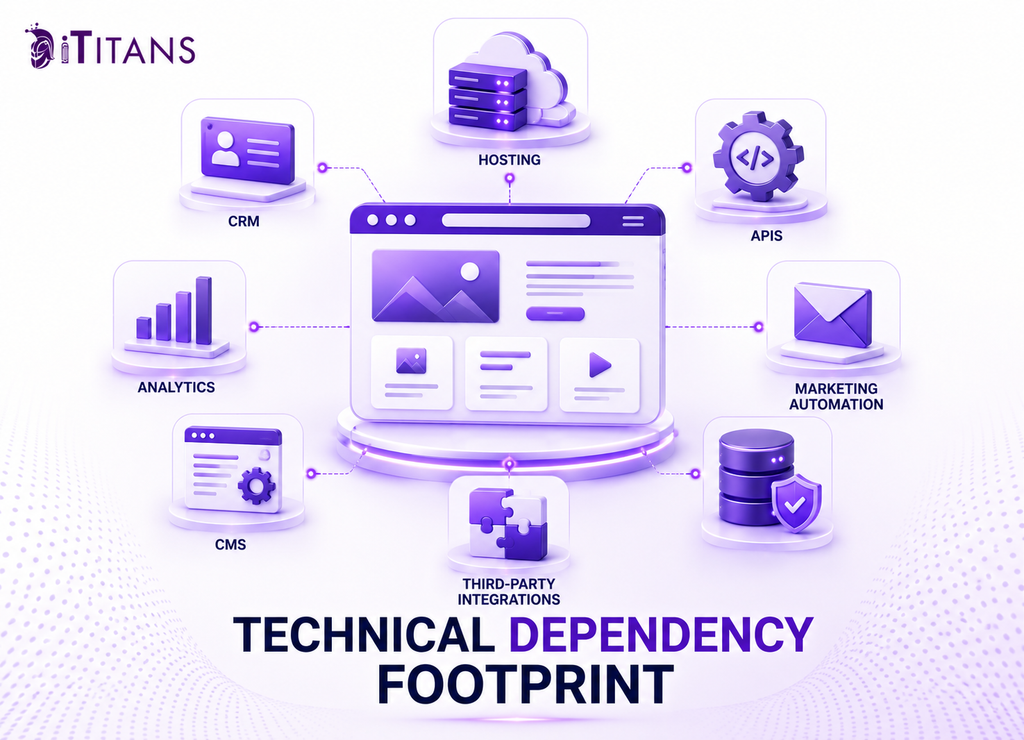
A five-page marketing site with a managed CMS is fundamentally different from a technology company’s website connected to a CRM, marketing automation platform, analytics stack, customer portal, knowledge base, multiple APIs, and third-party services. The second website has more technical dependencies and therefore creates more opportunities for compatibility problems, failures, and ongoing maintenance work.
These ranges should be used as budgeting references, not fixed quotes. A corporate website with a relatively simple technology stack may cost less to maintain than a smaller ecommerce platform with payment processing, customer accounts, inventory integrations, and custom functionality.
For a B2B technology company, therefore, using a generic average website maintenance cost as the budget benchmark can be misleading. The more useful question is what your website depends on and what would happen financially if one of those dependencies failed.
What Is Included in Website Maintenance?
What is included in website maintenance depends on the agreement, but recurring work generally falls into several technical and operational categories.
The first is infrastructure. Domain renewal and hosting keep the website accessible. Current pricing guides put domain costs around $10 to $20 or more per year, while hosting can range from roughly $5 to $15 per month for shared hosting, $20 to $80 for VPS hosting, and $80 to $300 or more for dedicated hosting.
SSL can range from free certificates to several hundred dollars annually for more advanced requirements. The actual expense depends on the certificate type and how the website’s infrastructure is managed.
The second category is the software stack. CMS updates, themes, plugins, frameworks, libraries, and custom components need to remain compatible. The more third-party components a website depends on, the more testing may be required after updates.
Security is another ongoing responsibility. Backups, malware scanning, firewalls, vulnerability checks, security patches, access controls, and monitoring all become increasingly important as a website becomes more closely tied to business operations.
Then there is content and technical support. A maintenance agreement may include routine content edits, broken-link fixes, form testing, performance checks, backups, and minor development changes. It may not include major redesigns, new application functionality, large migrations, or substantial integration projects.
The boundaries should be written into the maintenance agreement. Otherwise, a request that sounds like “a small website update” can become a scope dispute once development time, testing, deployment, and troubleshooting are involved.
For example, changing the copy on an existing service page may fall under content support. Rebuilding the page around a new interactive application, connecting it to a CRM workflow, and creating custom functionality is a development project.
Why Business Website Maintenance Costs Increase Over Time
The biggest cost driver is often not the website’s visual size. It is its technical dependency footprint.
Every integration introduces another system that can change independently of your website. A CRM can alter an API. A payment provider can change its requirements. A marketing platform can modify tracking scripts. A CMS can release a major version. A plugin developer can stop maintaining an extension. A hosting environment can change its PHP, database, or server configuration.
This is where technical debt becomes an operating expense.
Suppose a B2B company has a website connected to a CRM, lead-routing system, analytics platform, scheduling tool, and several marketing integrations. Maintaining the site means more than applying a CMS update. Someone needs to verify that forms still submit correctly, leads still reach the right system, tracking still fires, and critical user journeys still work after changes.
Ecommerce sites demonstrate the same principle at a larger scale. Payment processing, inventory, shipping, tax systems, product feeds, customer accounts, and fraud controls create additional points that need monitoring and testing. Current pricing models reflect this additional complexity, with ecommerce maintenance ranging from hundreds to several thousand dollars per month depending on functionality and support requirements.
The practical lesson for a CTO is straightforward: maintenance should be budgeted according to the systems the website must keep working with, not simply according to the number of pages on the site.
The Hidden Cost of Under-Maintaining a Website
The cheapest maintenance plan can become the most expensive option when it only covers visible updates and ignores the underlying systems.
A missed plugin update may not create an immediate problem. A neglected integration may continue working for months. An outdated dependency can remain invisible until another system changes. That is what makes deferred maintenance difficult to budget: the eventual expense is often triggered by failure rather than scheduled work.
Common consequences include security vulnerabilities, broken forms, compatibility problems, slow performance, downtime, and failed ecommerce workflows.
For a B2B technology company, the business impact can extend beyond the cost of repairing code. If a lead form stops submitting, a campaign can generate traffic without generating leads. If analytics breaks, marketing teams may make decisions using incomplete data. If a landing page becomes unavailable during a campaign, the company can lose the value of traffic it has already paid to acquire.
Emergency development also tends to cost more than planned maintenance. Current market pricing places developer support around $50 to $150 or more per hour, while monthly development retainers can start around $100 and reach $1,500 or more depending on scope.
A maintenance budget therefore needs to account for prevention as well as repair.
For founders, the key question is not simply whether the website is online today. It is whether the business has enough ongoing technical coverage to prevent predictable failures from becoming revenue, lead-generation, security, or launch problems.
How to Budget Website Maintenance Without Creating Cost Overruns
The most useful way to build a maintenance budget is to separate predictable platform costs from variable engineering and support work. A business may know its hosting and domain bills months in advance, but it cannot predict exactly when a plugin conflict, API change, broken form, security patch, or performance issue will require developer time.
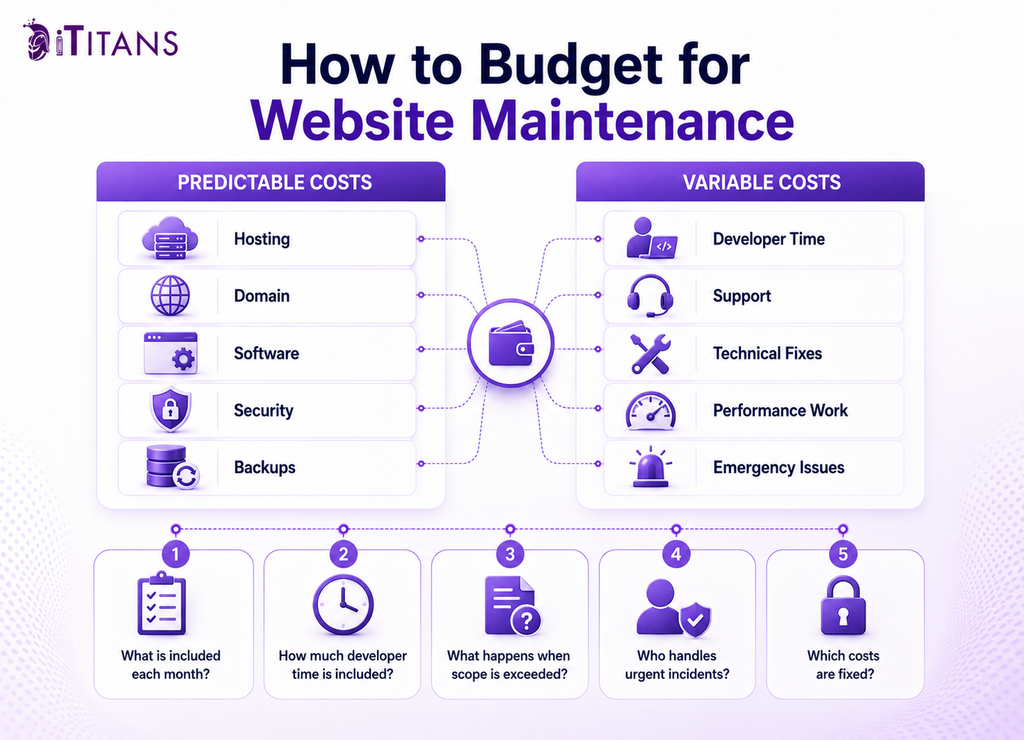
Current maintenance pricing frameworks commonly separate expenses such as domain renewal, hosting, business email, SSL, backups, security, monitoring, support and fixes, performance work, and a risk buffer. Support and performance work can each add hundreds of dollars per month when a website requires regular intervention, which is why the variable portion deserves its own budget rather than being buried inside a generic maintenance fee.
For businesses comparing monthly website maintenance packages, the budget should therefore answer five practical questions:
- Which infrastructure and software subscriptions are fixed?
- Which maintenance tasks are included every month?
- How much developer time is included?
- What happens when work exceeds the agreed scope?
- Who handles urgent incidents?
Without those answers, a low monthly retainer can create a misleading picture of the real website maintenance cost per month.
A useful contract should distinguish routine maintenance from development. Updating a CMS, testing a form after an update, restoring a backup, or fixing a minor compatibility problem belongs in maintenance. Building a new customer portal, replacing a CRM integration, redesigning a landing-page system, or developing a new calculator is development work.
That separation protects both sides. It prevents the business from paying for a large block of unused engineering capacity while also preventing the maintenance provider from absorbing major development projects under an unrealistic fixed fee.
DIY vs Hiring a Website Maintenance Company
For a simple website with few dependencies, internal maintenance can make financial sense. A team member can handle content changes, routine updates, backups, and basic checks if the website does not support a critical business process.
The calculation changes when the website becomes part of the company’s revenue infrastructure.
Professional maintenance becomes more valuable when leads and sales depend on the website, internal teams cannot consistently perform updates and backups, recurring performance issues exist, or a security incident could create significant financial or reputational damage.
The important comparison is not simply the monthly agency fee versus an employee’s salary. Founders and CTOs should consider the opportunity cost of assigning engineering resources to website maintenance.
If a software engineer spends several hours troubleshooting a CMS update, fixing an integration, testing forms, and investigating hosting problems, that time is not available for product development. For a technology company, the maintenance expense can therefore appear in two places: the website budget and the engineering team’s opportunity cost.
External support also becomes more useful when there is a clear response-time requirement. A lead-generation website that can tolerate a next-business-day fix has different requirements from a site where a broken form can interrupt a high-value sales campaign.
The right model is usually the one that matches the business risk rather than the one with the smallest advertised monthly fee.
What Actually Drives Website Maintenance Cost?
Several factors have a disproportionate effect on the final bill.
| Cost Factor | Lower Maintenance Requirement | Higher Maintenance Requirement |
| Website architecture | Standard CMS with limited customization | Custom application or heavily customized CMS |
| Integrations | Few third-party services | Multiple APIs, CRM, automation and analytics systems |
| Content changes | Occasional updates | Frequent campaigns and landing-page changes |
| Ecommerce | No transactions | Large catalog, payments and order workflows |
| Security | Standard business requirements | Customer accounts, payments or regulated data |
| Traffic | Moderate traffic | High or unpredictable traffic |
| Support | Business-hours response | Rapid incident response |
| Development | Minor fixes | Continuous feature development |
| Technical debt | Well-maintained codebase | Legacy code and recurring compatibility issues |
Website architecture is one of the biggest factors affecting the cost of website maintenance. A WordPress website using a limited number of well-supported plugins has a different maintenance profile from a custom application built around multiple frameworks and APIs. Custom code gives a company more control over functionality, but it also means the business may depend on developers who understand that codebase.
Third-party integrations create another recurring cost. CRM systems, marketing automation, analytics, payment systems, search tools, scheduling platforms, and customer databases can all introduce maintenance requirements. When one system changes, the website may need corresponding updates and testing.
Traffic and infrastructure requirements matter as well. Hosting limitations such as CPU, RAM, storage, and inode constraints can contribute to slowdowns, failed backups, media-upload problems, and recurring troubleshooting.
This is an important distinction because hosting that appears inexpensive can increase maintenance work. If developers repeatedly investigate slow response times only to discover resource limitations, the company is effectively paying twice: once for hosting and again for troubleshooting.
Change frequency is another major factor. A static site that changes a few times a quarter requires less hands-on work than a B2B website where marketing teams publish campaigns, update service pages, launch landing pages, modify forms, and connect new tools every week.
Security and compliance requirements can also materially change the scope. A website handling customer accounts, payments, sensitive information, or regulated workflows requires more than routine plugin updates. Access management, vulnerability monitoring, backup restoration, logging, patch management, and testing may all become part of the operating process.
WordPress Website Maintenance Cost vs. Custom Website Maintenance
For businesses using WordPress, wordpress website maintenance cost can vary considerably depending on the site’s plugins, themes, custom code, integrations, traffic, and security requirements.
A basic WordPress marketing website with a stable theme and a small number of plugins may require relatively limited maintenance. A heavily customized WordPress platform with WooCommerce, CRM integrations, membership functionality, analytics tools, and custom plugins can require substantially more ongoing work.
This is why wordpress maintenance cost should not be evaluated simply by comparing monthly package prices. The business should first identify what is actually included: WordPress core updates, plugin updates, backups, security monitoring, performance optimization, content support, troubleshooting, and development hours can all affect the final price.
In other words, the wordpress website maintenance cost is determined by the level of technical responsibility involved, not simply by the fact that the website runs on WordPress.
How to Compare Website Maintenance Plans
Comparing maintenance providers based only on monthly price is a common mistake. Two providers can quote the same monthly amount while delivering very different levels of coverage.
Start by comparing what happens when something breaks.
One provider may offer updates and backups but charge separately for every technical fix. Another may include a defined number of support hours. A third may provide monitoring, staging, testing, performance work, and a response-time commitment.
This is particularly important when evaluating monthly website maintenance packages. A package that looks inexpensive may have a narrow scope, while a higher-priced plan may include the technical coverage your business actually needs.
Then examine whether the plan includes actual verification. A backup that runs successfully is not the same as a backup that has been tested through a restoration process. An update that installs without an error message is not proof that the website’s forms, integrations, checkout, analytics, or key pages still work.
Staging environments are particularly useful for higher-risk updates because changes can be tested before they reach the live website. Restore testing is equally important because a backup is only valuable if the business can actually recover from it when needed.
For a B2B company, a useful maintenance agreement should clearly define:
- CMS, framework, theme, and plugin updates
- Backup frequency and restore testing
- Security monitoring and patching
- Uptime and error monitoring
- Form and critical workflow testing
- Performance monitoring
- Content and minor development allowances
- Support response times
- Emergency support
- Third-party integration responsibilities
- Work that is excluded from the monthly fee
This level of detail makes the quote easier to evaluate because the company is comparing scope and risk coverage rather than comparing two numbers with completely different assumptions.
When Website Maintenance Becomes More Expensive Than a Redesign
Maintenance does not mean keeping an old website alive indefinitely.
A website can reach a point where repeated fixes cost more than addressing the underlying architecture. This often happens when the CMS, plugins, framework, hosting environment, or custom code has accumulated years of technical debt.
The warning signs are usually operational rather than visual. Developers need increasingly more time to make small changes. Updates repeatedly cause compatibility problems. The site depends on abandoned plugins. Performance problems return after temporary fixes. Integrations require workarounds. Nobody is completely sure how parts of the system work.
At that point, continuing to pay for isolated fixes can become a form of technical debt repayment without actually reducing the debt.
A redesign or rebuild may be justified when the existing architecture prevents the business from making necessary changes efficiently. But that decision should be based on maintenance history and business requirements, not simply because the website looks old.
Custom-coded websites, ecommerce platforms, and sites with frequent changes or multiple integrations generally require more ongoing work than simpler websites.
For CTOs, the useful question is therefore not “How old is our website?” It is “How much engineering effort does the current architecture require to keep meeting today’s requirements?”
That distinction helps avoid two expensive mistakes: rebuilding a perfectly serviceable website simply because it is several years old, or continuing to patch an architecture that is already preventing the business from moving forward.
A Practical Website Maintenance Budget for B2B Companies
The most defensible budget starts with the actual technology stack and business dependency rather than an industry average.
Current maintenance pricing models place professional support for small business websites around $100 to $300 per month in some packages, WordPress maintenance around $100 to $400, WooCommerce maintenance around $300 to $1,500 or more, and membership or LMS websites around $400 to $2,000 or more.
Broader market pricing can be substantially higher for corporate and enterprise websites. Corporate maintenance can reach $1,000 to $5,000 or more per month, while enterprise requirements can reach $2,000 to $25,000 or more when infrastructure, security, integrations, support, and ongoing development are included.
The difference between these ranges is itself useful information. It demonstrates that average website maintenance cost is not a sufficiently precise planning metric. Providers are pricing different levels of infrastructure, support, complexity, and risk.
For an iTitans clients, the better approach is to build the budget from actual requirements:
Fixed infrastructure costs + software and security costs + planned maintenance hours + expected development work + emergency risk allowance
Then review the budget whenever the website gains a new integration, payment workflow, customer-facing feature, content operation, or infrastructure requirement.
The objective is not to spend as little as possible. It is to make the cost predictable enough that maintenance does not repeatedly appear as an unexpected engineering project.
What Should Your Website Maintenance Budget Include?
When estimating website maintenance cost per month, businesses should account for both predictable expenses and variable technical work.
A practical budget may include:
- Hosting and infrastructure
- Domain and DNS management
- SSL and security tools
- CMS, plugin, and framework updates
- Automated backups
- Security monitoring
- Performance monitoring
- Content changes
- Bug fixes
- Integration maintenance
- Developer support hours
- Emergency response
- A contingency allowance for unexpected technical issues
This approach provides a more realistic view of the cost for website maintenance because it accounts for the work required to keep the entire digital system operational.
Keep Your Website Working for Your Business
iTitans helps businesses manage ongoing website maintenance, technical updates, security, performance, integrations, and support without leaving critical issues for your internal team to handle.
Frequently Asked Questions
How Often Should a Business Website Be Updated?
Core software, plugins, frameworks, and security patches should be checked regularly, while content, forms, integrations, and performance should be reviewed according to how frequently the website changes. A business-critical website generally needs more frequent technical checks than a simple informational site.
Do I Really Need Website Maintenance if My Website Still Works?
Yes. A website can appear functional while using outdated software, vulnerable plugins, broken integrations, or untested backups that may cause problems later.
Is Website Maintenance the Same as Web Hosting?
No. Hosting provides the infrastructure where the website runs, while maintenance covers updates, security, backups, monitoring, troubleshooting, performance work, and technical support.
Can I Maintain My Business Website Myself?
You can manage a simple website internally if your team has the technical skills and time for updates, backups, security, and troubleshooting. For a website that generates leads or supports revenue workflows, the opportunity cost and technical risk can make external maintenance more practical.
What Happens if I Don’t Maintain My Website?
Neglected maintenance can lead to outdated software, security vulnerabilities, broken functionality, slower performance, failed integrations, and more expensive emergency repairs. The business impact can extend to lost leads, disrupted campaigns, and downtime.
Can a Website Maintenance Company Manage a Site Built by Another Agency?
Yes. A maintenance provider can generally take over an existing website when the business has the required ownership and access to its domain, hosting, CMS, codebase, analytics, and third-party services.
How Long Does Website Maintenance Take Each Month?
There is no fixed number of hours because the workload depends on architecture, integrations, traffic, security requirements, content activity, and support expectations. A simple marketing website may require limited technical intervention, while a complex B2B or ecommerce platform can require ongoing development and monitoring.
What Should I Check Before Choosing a Website Maintenance Plan?
Look beyond the monthly price and check whether the agreement covers updates, backups and restoration, security, monitoring, performance, support response times, integrations, content changes, emergency fixes, and work that falls outside the monthly scope.