

Redesigning a Website Without Losing Organic Traffic
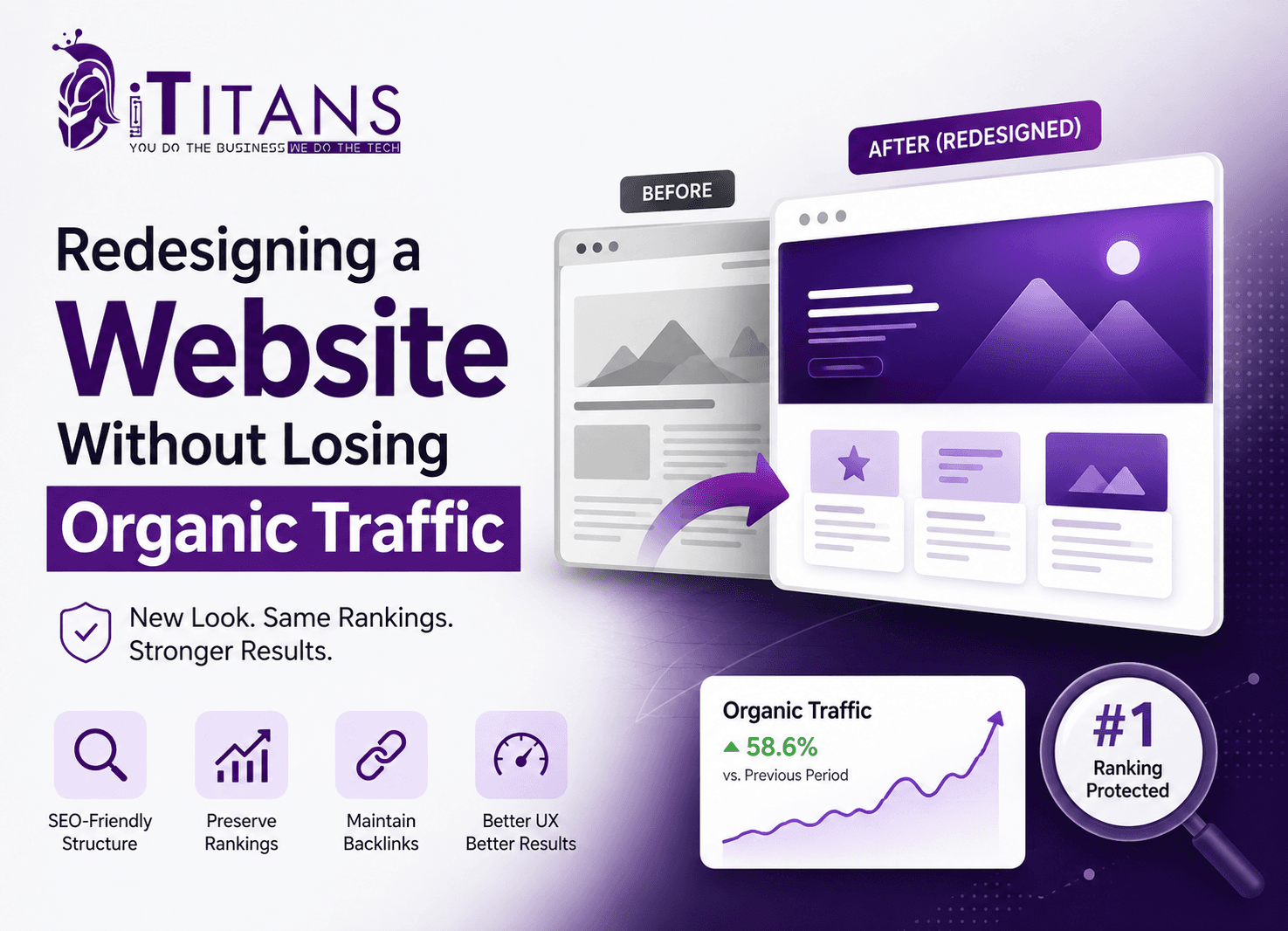
You have good reasons to redesign your website: better UX, faster load times, a fresher brand look. But every year, businesses learn the hard way that redesigns and search rankings do not automatically get along.
Redesigning a website without losing organic traffic means treating the migration as an SEO project, not only a design refresh. In practice, that means auditing current URLs, mapping every old page to a new one with 301 redirects, preserving top-performing content and metadata, keeping internal links intact, and monitoring Google Search Console closely after launch, so search engines can transfer the rankings you already earned to the new pages.
In this blog, we are going to guide you how to redesign a website without losing SEO, step by step, from the pre-launch audit through the first 90 days after you go live.
Why Website Redesigns Put Organic Traffic at Risk
A redesign is never just cosmetic. Search engines re-crawl and re-evaluate your entire site once you change layouts, code, and URLs. If you don’t plan that transition carefully, you risk losing the signals that earned your current rankings.
The scale of the risk is real. Some reports document traffic drops of 60 to 70 percent in the weeks after a rushed relaunch. Sites with hundreds of changed URLs and strong inbound links can lose the majority of their organic traffic within weeks of launch.
In one widely reported case, a small painting company lost 97 percent of its organic traffic after a redesign replaced hundreds of blog posts and service pages with a six-page brochure site, turning every old link into a 404 error.
Common causes include:
- URL changes without matching 301 redirects
- Deleted or merged pages that used to rank
- Rewritten titles, meta descriptions, and headers that lose keyword relevance
- Broken internal links pointing to old URLs
- Slower page speed or weaker mobile usability in the new design
- Missing or outdated XML sitemaps at launch
None of this makes a redesign inherently risky. Some ranking fluctuation is normal during any site move, even a clean one. The goal isn’t to avoid change, it’s to control it.
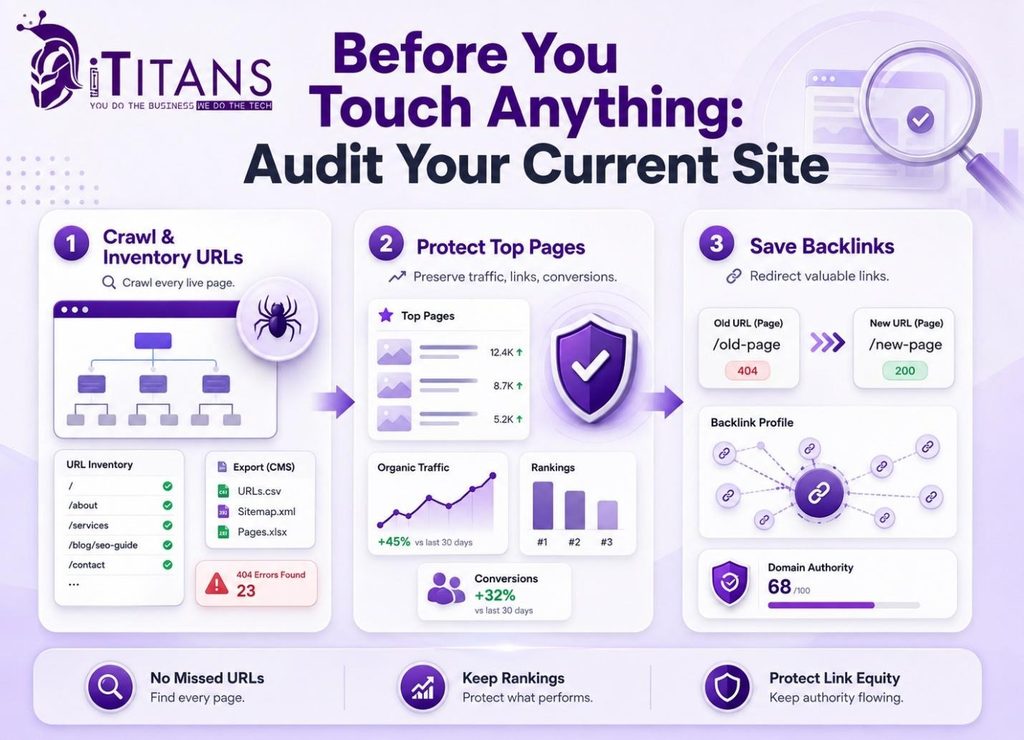
Before You Touch Anything: Audit Your Current Site
Crawl and Inventory Every URL
Before any design work starts, crawl your existing site with a tool such as Screaming Frog or Ahrefs, or export a list from your CMS, and build a complete inventory of live URLs. This becomes your baseline for every page you might redirect, merge, or remove later.
Skipping this step is the most common reason redesigns lose traffic, because teams simply forget pages exist until visitors start hitting 404 errors.
Identify Your Highest-Value Pages
Not every page deserves equal protection. Pull organic traffic, backlink, and conversion data from Google Analytics and Search Console to flag your top performers, then treat those URLs as non-negotiable during the rebuild. A technical SEO audit before the redesign starts saves weeks of cleanup after launch.
Save Your Backlink Profile
Export your backlink report from Search Console or a third-party tool before launch. Every link pointing to a URL that disappears becomes wasted trust, unless you redirect it to the closest equivalent new page.
Website Redesign SEO Checklist: What to Protect During Migration
Once your audit is complete, work through this website redesign SEO checklist before your developer pushes anything live. Treat it as a sign-off list, not a suggestion, since skipping even one row is usually what turns a normal ranking dip into a lasting loss.
Your Pre-Launch Checklist at a Glance
| Checklist Item | Why It Matters |
|---|---|
| Build a one-to-one URL redirect map | Matches every old URL to its closest new equivalent so ranking signals transfer correctly |
| Use 301 redirects, not 302s | 301s signal a permanent move, while 302s tell search engines the change is temporary |
| Keep existing title tags and meta descriptions | Preserves the relevance signals that already earned your current rankings |
| Preserve heading structure and target keywords | Keeps topical relevance intact on pages that already rank well |
| Maintain internal links between related pages | Helps search engines recrawl and understand your new site structure faster |
| Limit redirect chains to two or three hops | Long chains slow crawling and can weaken the signals passed through them |
| Test everything on a staging site first | Catches broken redirects and missing content before real visitors or Googlebot see them |
| Submit an updated XML sitemap at launch | Speeds up discovery and indexing of your new URLs |
The Redirect Myth Most Guides Get Wrong
A lot of redesign advice repeats the claim that redirects quietly drain ranking power, so businesses should minimize them. That’s outdated. Google’s own site-move documentation, updated as recently as this month, states directly that 301 and other permanent redirects do not cause a loss of PageRank.
The real risk isn’t the redirect itself, it’s what happens around it: missing redirects that produce 404 errors, chains stacked five or six hops deep, or entire sections redirected to the homepage instead of their closest match. Map your 301 redirects for website migration correctly, and they protect your rankings instead of draining them.
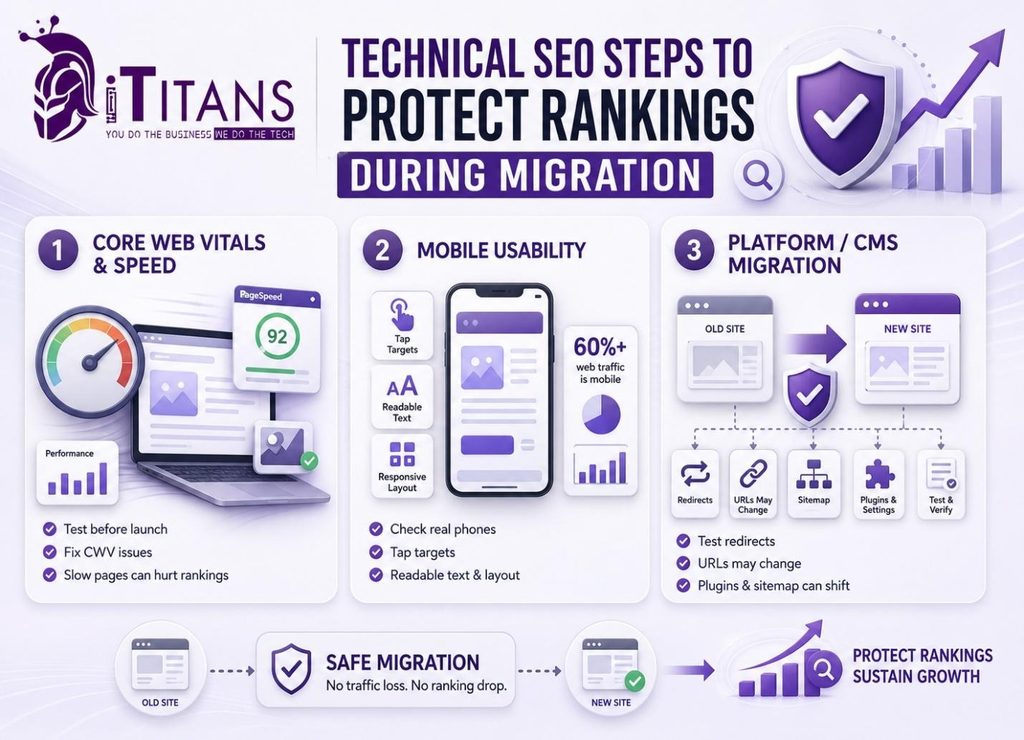
Technical SEO Steps to Protect Rankings During Migration
Core Web Vitals and Page Speed
New themes, animations, and larger images often slow a redesigned site down, and speed is part of Google’s confirmed page experience signals. Run your new site through PageSpeed Insights before launch, and fix anything flagged in Core Web Vitals, since a slower site can undo the ranking gains a fresh design was meant to deliver.
Mobile Usability
Google indexes the mobile version of your site first, and mobile devices already account for well over 60 percent of all web traffic. Check tap targets, font sizes, and layout on real phones, not just a resized browser window, before you call the redesign finished.
Platform and CMS Migrations
If your redesign includes a platform change, such as moving to WordPress from a legacy CMS, budget extra time for redirect testing. Platform migrations introduce more moving parts at once, since URL structures, plugin behavior, and sitemap generation can all shift together.
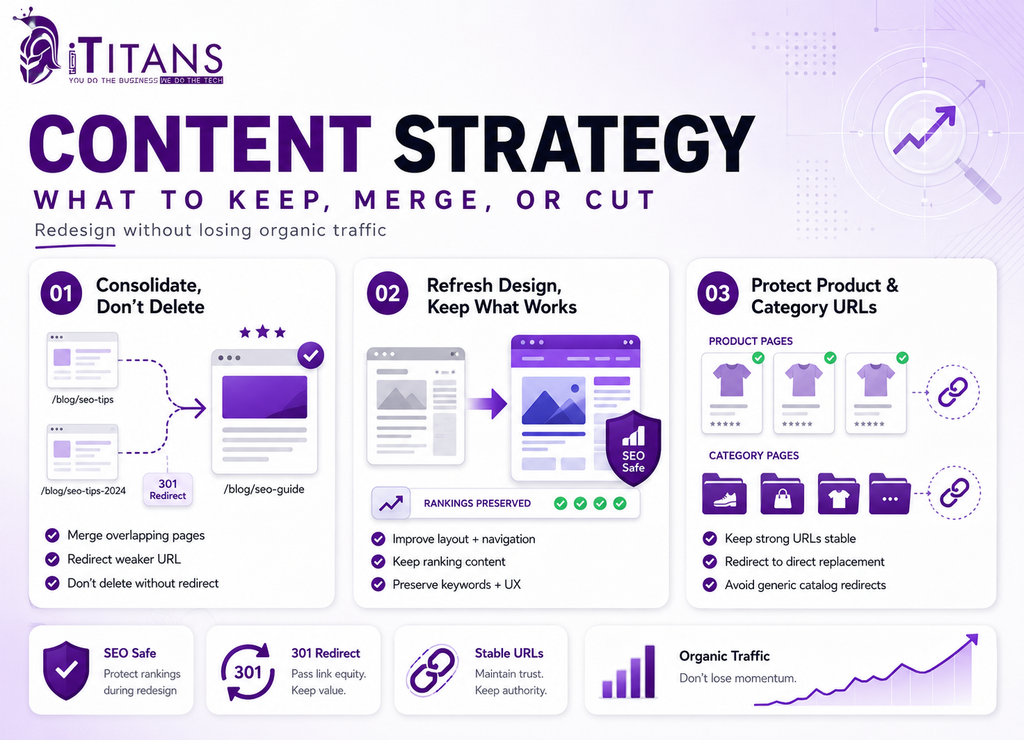
Content Strategy: What to Keep, Merge, or Cut
Consolidate, Don’t Delete
If two thin pages cover overlapping topics, merge them into one stronger page and redirect the weaker URL to it. Deleting content outright, without redirecting it anywhere, is one of the fastest ways to turn a design refresh into a traffic collapse.
Refresh the Design Without Rewriting What Works
A visual overhaul doesn’t require rewriting every paragraph. Where a page already ranks well, focus your redesign on layout, navigation, and UX design, and leave the core content and keyword targeting largely intact.
Handle Product and Category Pages Carefully
Product and category URLs on an ecommerce site often carry years of accumulated ranking signals. Keep those URLs stable wherever you can, and redirect any that must change directly to their replacement rather than to a generic catalog page.
Post-Launch Monitoring: The First 90 Days
Launch day is the start of the real work, not the finish line. Search engines need time to recrawl and reindex a redesigned site, and the first 90 days determine whether ranking fluctuation settles down or turns into a lasting drop.
Your 90-Day Monitoring Timeline
| Timeframe | What to Check | Where to Check It |
|---|---|---|
| Week 1 | Crawl errors, 404s, and redirect loops | Search Console, Coverage report |
| Weeks 2 to 4 | Indexing of new URLs versus old URLs | Search Console, Sitemaps report |
| Month 2 | Ranking movement for your top keywords | Search Console, Performance report |
| Month 3 | Organic traffic trend against your pre-launch baseline | Google Analytics |
Expect some volatility even in a clean migration. Watch for a metric that keeps falling past the 90-day mark instead of leveling off, since that usually points to one specific unresolved issue rather than normal settling.
How iTitans Helps You Redesign Without Losing Search Visibility
iTitans brings design skill and SEO discipline together under one roof, so your new site launches looking better and ranking at least as well as the one it replaces. SEO for website redesign isn’t a bolt-on service here, it’s built into every project from the start.
Website Development Built Around Your Existing SEO Equity
iTitans’ website development team starts every redesign with a full audit of your current site’s top-performing pages, backlinks, and URL structure, then builds the new site around preserving that equity instead of starting from a blank page. Redirect mapping, metadata migration, and staging-site testing are part of the standard process.
SEO-Led Migration Support
For businesses that want SEO involved from day one, our team handles technical audits, redirect strategy, and post-launch monitoring so ranking dips get caught and fixed within days, not months. You can see examples of past redesign projects in our portfolio.
Design That Doesn’t Sacrifice What Already Works
Our web design process focuses on layout, navigation, and user experience improvements while keeping the content and keyword targeting that already earn organic traffic intact, so the finished site looks modern without starting your rankings from zero.
Ready to Redesign Without the Traffic Drop?
Redesigning a website without losing organic traffic is entirely possible when SEO is part of the plan from day one, not a fix applied after launch. Audit your current site, map every URL to a 301 redirect, preserve the metadata and content that already ranks, and watch Google Search Console closely for the first 90 days after you go live.
Skip these steps, and even a beautifully designed new site risks the traffic drops, broken links, and lost rankings this guide walked through. If you’re planning a redesign and want a team that treats SEO as part of the build, not an afterthought, get in touch with iTitans to start with a site audit before a single page changes.
Frequently Asked Questions
Does redesigning a website affect SEO?
Yes, almost always. A redesign changes URLs, code, and content that search engines use to rank pages, so expect some ranking movement, especially in the first few weeks after launch.
How long does it take to recover SEO rankings after a redesign?
Most sites see rankings stabilize within a few weeks to three months when you handle redirects and metadata correctly. Larger sites or major URL changes can take longer to fully recover.
Should I keep the same URLs when redesigning my website?
Yes, where possible. Keeping existing URLs avoids the need for redirects altogether. Only change a URL for a clear structural or strategic reason, and always redirect it with a 301 if you do.
What is the biggest SEO mistake during a website redesign?
Deleting or moving pages without setting up 301 redirects. This turns previously ranked URLs into 404 errors, breaking the links search engines and other websites already trust and pass authority through.
Do I need 301 redirects for every old page on my site?
Yes, every URL that had traffic, backlinks, or rankings needs a 301 redirect to its closest new equivalent. Redirecting everything to your homepage instead can look like a soft 404 error to Google.
How do I check if a website redesign hurt my SEO?
Compare Search Console’s Coverage and Performance reports from before and after launch. A spike in 404 errors or a sustained drop in clicks and impressions signals something in the migration needs fixing.