

How to Structure a Next.js Site for SEO Without Breaking Hydration

Building a Next.js website for search is not simply a matter of adding metadata and submitting a sitemap. The way you structure Server Components, Client Components, rendering, and hydration can directly affect how search engines access and interpret your content.
For B2B technology companies, that architecture matters because service pages, product pages, and technical content often need to generate organic visibility long after launch. Knowing how to structure a Next.js site for SEO helps teams keep important content server-rendered while reserving client-side JavaScript for genuine interaction.
The result is an architecture that supports crawlability, Core Web Vitals, maintainability, and future SEO growth without creating unnecessary hydration problems.

Why Next.js Architecture Matters for SEO
Next.js gives development teams several ways to render and organize an application, but those choices have different implications for search, performance, and maintainability.
In the App Router, layouts and pages are Server Components by default. Next.js recommends Server Components for fetching data, keeping secrets on the server, reducing JavaScript sent to the browser, and improving initial rendering. Client Components are intended for functionality that requires state, event handlers, effects, browser APIs, or custom hooks.
That distinction matters for B2B websites because most search-critical content does not need client-side interaction.
A service page may contain a primary heading, service description, industry information, case studies, FAQs, and internal links. Those elements can generally be produced on the server. A pricing calculator, interactive comparison tool, filtering interface, or form may require client-side behavior.
The architectural mistake is making the entire page client-side simply because one component is interactive.
The server should own search-critical content
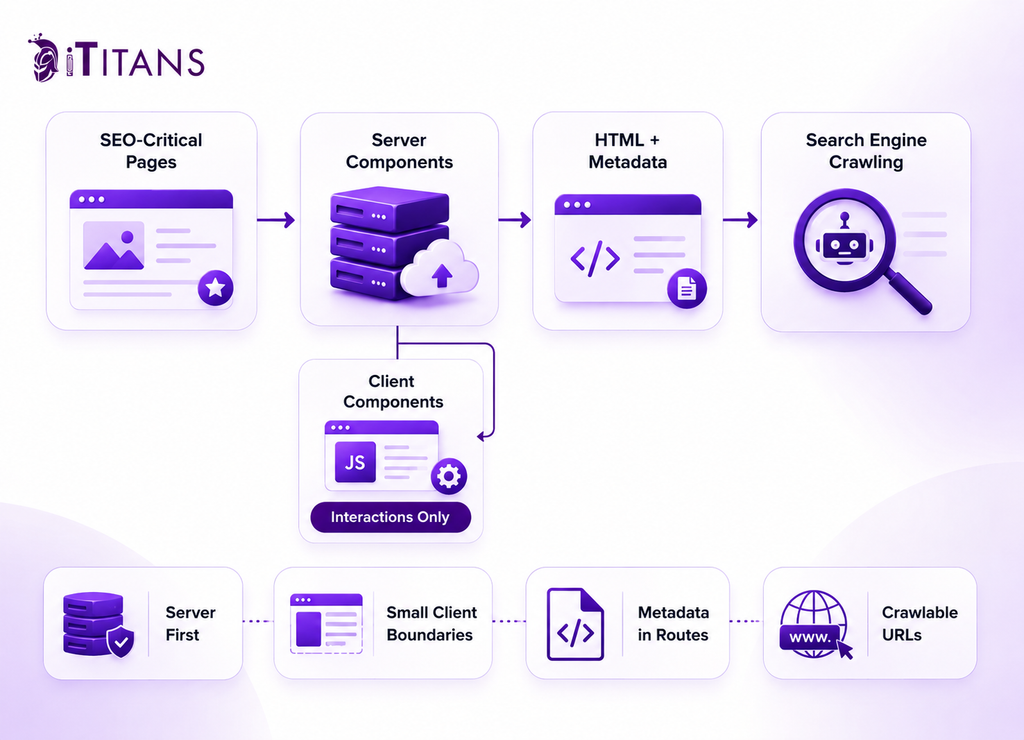
A practical Next.js SEO best practice is to start with the page as a Server Component and introduce Client Components only where a specific feature requires them.
For example, consider a B2B technology page containing:
- A service introduction
- Industry-specific copy
- Case studies
- Related resources
- An ROI calculator
- A contact form
The first four sections are primarily content. The calculator and form may need React state, event handlers, or browser APIs.
Keeping the calculator and form as Client Components allows the surrounding page to remain server-oriented. Next.js explicitly documents this composition model, including placing Client Components inside Server Components.
This separation also matters for the amount of JavaScript sent to the browser. When a file contains use client, it creates a boundary between the server and client module graphs. Its imports and dependencies become part of the client bundle.
For a website with dozens of templates, putting that boundary too high in the component tree can create unnecessary client-side work across many routes.
How to Structure Next.js for SEO Without Breaking Hydration
Hydration is not inherently an SEO problem.
Next.js describes hydration as the process through which React attaches event handlers to the server-rendered HTML so Client Components become interactive. During the first load, HTML can be displayed before hydration completes, while the React Server Component Payload and JavaScript are used to reconcile and hydrate the client-side portions of the application.
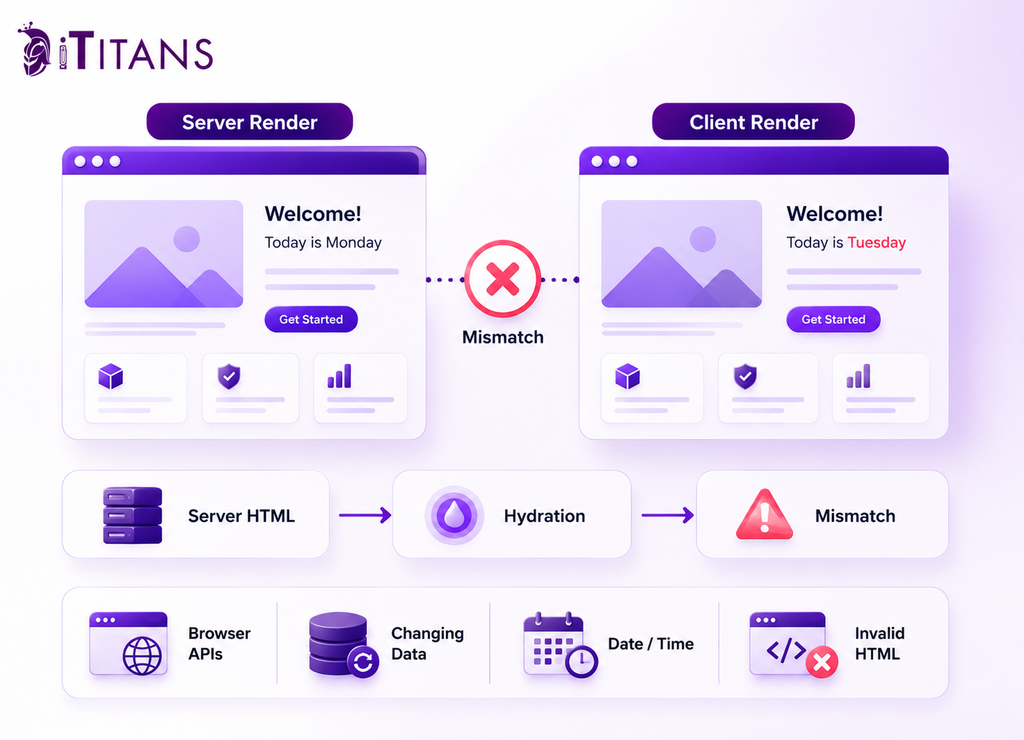
The problem occurs when the server and browser produce different output during that initial process.
React expects the client-rendered tree to match the server-rendered HTML during hydration. Next.js identifies several common causes of mismatches, including browser-only APIs, changing values such as dates, browser-dependent conditional rendering, invalid HTML nesting, and external data that differs between server and client.
For example, this pattern creates risk:
A component reads localStorage while rendering and uses that value to determine the initial page content. The server cannot access the visitor’s local storage, so it renders one result. The browser then renders another result during hydration.
The solution is not to make the entire page client-rendered.
Instead, isolate the browser-dependent behavior.
Keep browser-specific logic away from core content
Search-critical content should not depend on information that exists only in an individual visitor’s browser unless there is a genuine product requirement.
Good candidates for server rendering include:
- Primary headings
- Product and service descriptions
- Supporting page copy
- Important internal links
- Article content
- FAQ content
- Data retrieved from a CMS or backend
- Search-relevant structured content
Client Components should handle functionality that actually needs the browser.
This distinction aligns with Google’s JavaScript SEO guidance. Google Search can process JavaScript, but Google also documents limitations in how JavaScript resources and content are crawled and rendered. Its JavaScript SEO guidance describes crawling, rendering, and indexing as separate stages rather than treating browser execution as equivalent to ordinary HTML delivery.
For a B2B company, this makes server-first architecture a sensible risk-management decision. It reduces dependence on client-side execution for information that needs to be understood and indexed.
Keep Client Components as Small as the Feature Requires
The placement of use client deserves attention during architecture planning.
Suppose an article page contains a small interactive table of contents that needs browser state. There is little reason for the article itself to become a Client Component.
The same principle applies to:
- Search filters
- Calculators
- Interactive charts
- Login controls
- Product configurators
- Form validation
- Client-side personalization
The component that requires interaction can sit inside a Server Component.
Next.js recommends this composition approach because Server and Client Components can be nested together. It also notes that Client Component boundaries should be placed thoughtfully because everything imported into the boundary becomes part of the client-side module graph.
For engineering teams, this is more than an SEO consideration. It affects bundle size, debugging, testing, and long-term maintenance.
A shared layout is a particularly important example. If a top-level layout becomes a Client Component unnecessarily, the decision can influence every route below it. Next.js specifically recommends rendering providers as deep in the tree as possible so static parts of the Server Component tree remain easier for Next.js to optimize.
That is why architecture decisions should be made at the component level rather than simply deciding that a whole website should be “client-side” or “server-side.”
Do Not Hide Hydration Problems
When a hydration warning appears, suppressing it is not the same as solving it.
A hydration mismatch can reveal that the application is producing inconsistent output. If the difference affects meaningful page content, simply hiding the warning can allow an architectural problem to remain.
The investigation should start with the component producing different output between server and client.
Check for:
- window or localStorage being accessed during rendering
- Dates or random values changing between renders
- Conditional logic based on browser availability
- External data changing between server and client
- Invalid HTML nesting
- Third-party code modifying rendered markup
If the feature genuinely depends on the browser, move that behavior into an appropriate Client Component or client-side effect instead of forcing unrelated page content into the client.
The objective is consistency: the server should produce the expected initial content, and the browser should hydrate that content without unexpectedly replacing it.
Build Metadata Into the Route Architecture
SEO metadata should be part of the Next.js route structure rather than an afterthought added by a separate client-side system.
Next.js provides the Metadata API through the static metadata object and the generateMetadata function. Both are supported in Server Components, and Next.js states that generated metadata can be included in the initial HTML when the page can be prerendered without introducing dynamic behavior.
That has an important architectural consequence.
If a page needs a title and description based on CMS content, the metadata can be generated from the same underlying data used to render the page.
For example, a dynamic article route might retrieve the article record and use its title and description for both the visible page and its metadata. This reduces the risk of having the page content and metadata describe different things.
Use route hierarchy for metadata
The App Router supports layouts and nested route segments, which makes it possible to establish metadata defaults at appropriate levels while allowing individual pages to define their own information.
For a B2B website, that could mean defining shared metadata behavior for a blog section while allowing individual articles to provide their own titles, descriptions, and social sharing information.
This becomes especially important when a site contains dynamically generated pages.
Before development begins, define what data each indexable page requires:
- Page title
- Meta description
- Canonical URL
- Open Graph information where appropriate
- Indexability status
- Structured data where relevant
That prevents SEO requirements from appearing halfway through development and forcing changes to the CMS or API.
Structure URLs Around Real Search Intent
Next.js uses a file-system-based App Router, meaning route segments and application structure are closely connected. Dynamic segments can generate pages such as blog/[slug], while nested layouts can organize related sections of the site.
For SEO, the important question is not how many routes Next.js can generate.
It is which routes deserve to exist as search landing pages.
A B2B technology company might have service pages, industry pages, product pages, case studies, and educational resources. Those groups should reflect the actual business and content strategy.
A database might contain hundreds of records, but that does not mean every record deserves an indexable URL.
Search filters, internal search results, temporary states, duplicate records, and low-value variations can create URLs without creating useful landing pages. If those routes are generated automatically, the SEO team may later need to deal with indexation, canonicalization, redirects, and maintenance issues.
This is where SEO planning directly affects development costs.
If the URL model changes after the site has launched, developers may need to modify routes, redirects, internal links, analytics tracking, CMS references, and deployment logic. What initially looked like an SEO change can become a larger engineering project.
A defined URL model before development reduces that risk.
Next.js also provides file conventions for generating sitemaps and robots files, allowing these technical SEO elements to be connected to the application’s route structure. Its production guidance specifically lists metadata, sitemaps, and robots files as part of the production SEO setup.
The principle is simple: the application should know which pages exist, and the SEO system should know which of those pages are intended for search.
Connect Internal Linking to the Site Architecture
A technically sound Next.js application can still struggle in search if important pages are poorly connected. For B2B technology companies, internal linking should reflect the relationship between educational content, commercial pages, products, industries, and case studies.
Google recommends that important pages be linked from other pages on the site and that links use crawlable anchor elements. Descriptive anchor text also helps Google understand the destination page.
That means internal linking should be considered when the content architecture is designed, not added as an SEO cleanup task after development.
For example, an article explaining Next.js SSR vs CSR for SEO can link to a relevant development service when that service genuinely helps the reader. A case study can link to the technology or service used in the project. An industry page can connect visitors to the specific services relevant to that industry.
The links should communicate relationships rather than simply increase the number of links on a page.
Use contextual links instead of relying only on navigation
Main navigation is important, but it cannot communicate every relationship within a large B2B website.
A blog article about improving a Next.js application’s performance may be several clicks away from a development service in the main navigation. A relevant contextual link within the article gives both users and search engines a direct relationship between those resources.
This becomes especially useful when Next.js content is managed through a CMS. Related articles, services, case studies, and resources can be selected from structured content relationships instead of manually inserting links throughout every page.
That approach also makes maintenance easier. When the content model knows that an article belongs to a particular service category, the application can surface relevant links without requiring developers to edit the page template each time new content is published.
The important limitation is quality. Automatically generating large collections of “related links” does not necessarily improve the site. The relationship should make sense to someone reading the page.
Generate Structured Data From Reliable Page Data
Structured data is another area where SEO and application architecture should meet.
Google uses structured data to understand supported content types and potentially make eligible pages appear with enhanced search features. However, structured data does not guarantee a rich result, and Google requires the markup to represent the visible page accurately.
For Next.js websites, structured data can be generated from the same server-side data used to render the page.
An article stored in a CMS, for example, can provide its title, author, publication date, and other relevant fields for appropriate Article structured data. A product page can use authoritative product information when Product structured data is applicable.
This avoids maintaining two separate content systems.
If the visible article title changes but a manually maintained JSON-LD object still contains the old title, the application is publishing conflicting information. Generating structured data from the underlying content source reduces that risk.
Google also documents JavaScript-based structured data implementation, including dynamically generated markup.
For SEO-critical pages, server-side generation is often easier for engineering teams to inspect and test because the structured data is associated with the same rendering process as the page itself.
The important point is not to add schema simply because a schema type exists. First determine whether the page qualifies for a supported Google search feature and whether the markup accurately describes its visible content.
Treat Core Web Vitals as Engineering Requirements
Hydration is only one part of the technical picture. A Next.js site can have no hydration errors and still deliver a poor user experience.
Google currently defines three Core Web Vitals:
- Largest Contentful Paint, with a good threshold of 2.5 seconds or less
- Interaction to Next Paint, with a good threshold of less than 200 milliseconds
- Cumulative Layout Shift, with a good threshold of 0.1 or less
Google recommends evaluating these metrics using real-user data as well as diagnostic tools. Core Web Vitals are used by Google’s ranking systems, although meeting the thresholds does not guarantee high rankings.
The architecture of a Next.js application can influence these measurements.
A large Client Component boundary can increase the amount of JavaScript sent to the browser. Heavy third-party scripts can delay interaction. Poorly sized images can contribute to layout shifts. An interactive feature that requires significant client-side processing can affect responsiveness.
Next.js provides features such as automatic code splitting and image optimization, but those features do not remove the need for sound application architecture.
For B2B companies, performance should therefore be monitored after launch rather than judged only from a pre-launch Lighthouse test.
A practical technical SEO monitoring process should track:
- Core Web Vitals
- Hydration errors
- Important page templates
- JavaScript bundle growth
- Mobile rendering
- Crawlability
- Indexation
- Metadata output
This is particularly important when marketing teams continue adding analytics tools, chat widgets, personalization, forms, video, calculators, and other functionality after the original launch.
Every addition can affect the browser experience.
Avoid Next.js SEO Decisions That Create Technical Debt
Some technical choices are easy to make during development but expensive to reverse later.
Turning an entire page into a Client Component
Adding use client to a page because one section needs interaction is usually broader than necessary. Next.js recommends placing Client Component boundaries around the functionality that actually requires client-side features.
If an entire template becomes client-side, future developers may inherit that decision even when most of the page is static content.
Using browser-only values for initial content
Values from window, localStorage, browser dimensions, or other client-only APIs should not unexpectedly determine the initial server-rendered output.
Next.js identifies browser-only APIs and browser-dependent conditional rendering among common causes of hydration mismatches.
Suppressing hydration warnings instead of investigating them
React describes suppressHydrationWarning as an escape hatch for unavoidable differences. It is not a replacement for fixing an application that produces inconsistent server and client output.
If the mismatch involves a heading, product description, navigation element, or other meaningful content, the underlying cause deserves investigation.
Creating indexable pages from every database record
A CMS or database may make it technically easy to generate thousands of URLs. SEO does not require all of them to be indexed.
Before implementing dynamic routes, define which page types have enough value, uniqueness, and search intent to deserve organic visibility.
Adding SEO requirements after development
This is where project costs can expand quickly.
Changing a meta description after launch is straightforward. Changing the URL structure can affect redirects, internal links, analytics, CMS references, external links, and historical rankings.
Likewise, discovering that the page needs information that the CMS does not store can require changes to the database, API, content model, and front-end components.
SEO requirements should therefore be documented before the development team commits to the final architecture.
A Practical Architecture for B2B Next.js Websites
There is no single component tree that every B2B company should copy. A SaaS platform, technology consultancy, marketplace, and enterprise documentation site have different application requirements.
The useful approach is to establish architectural rules that remain consistent across templates.
Keep pages server-first
Use Server Components for content and layouts that do not require browser interaction. Retrieve search-critical content through the server-side architecture where practical.
Isolate interactive functionality
Use Client Components for state, event handlers, effects, browser APIs, and other functionality that genuinely requires the browser. Keep the client boundary close to the feature rather than moving the entire page into it.
Make SEO metadata part of the application
Use Next.js’s Metadata API for static and dynamic metadata. Define title and description rules for every important route type rather than relying on a single generic site-wide configuration.
Define indexable routes before generating them
Decide which service, product, industry, article, and resource URLs should be searchable before dynamic routing is implemented.
Test production behavior
Test the production build, not only the development environment. Monitor real-user performance after launch because laboratory measurements and field measurements answer different questions.
This planning also protects the project from several common B2B development problems.
A clear architecture can reduce scope creep because SEO requirements are identified before implementation. It can reduce launch delays because redirects, metadata, structured data, and indexation rules are not discovered at the final QA stage. It can reduce technical debt because developers are not repeatedly restructuring shared components to accommodate requirements that should have been defined earlier.
What Founders and CTOs Should Ask Before Development Starts
Founders and CTOs do not need to review every React component, but they should understand the architectural decisions that can affect acquisition, cost, and future maintenance.
Before approving a Next.js project, ask the development and SEO teams five questions.
Which pages are expected to generate organic traffic?
The answer should identify actual page types and business priorities. If every URL is considered equally important, the team probably has not defined the information architecture clearly enough.
Which content needs to be available without client-side interaction?
Search-critical copy should have a clear rendering strategy. If the answer is that users must wait for browser JavaScript before the primary content exists, the team should explain why.
Where are the Client Component boundaries?
The development team should be able to identify which features need client-side behavior and why. This makes unnecessary client-side scope easier to detect.
How are metadata and structured data generated?
There should be a defined relationship between the CMS or application data and the metadata presented to search engines.
How will performance be measured after launch?
Google recommends using real-world field data when evaluating Core Web Vitals. A pre-launch performance score alone cannot show how the site behaves for actual visitors.
These questions create a useful bridge between business planning and engineering.
Build Your Next.js Website With SEO in the Architecture
iTitans can help align your website architecture, SEO requirements, performance considerations, and business objectives so SEO is considered during development rather than treated as a post-launch repair task.
Frequently Asked Questions
Is Next.js good for SEO if a website uses a lot of JavaScript?
Yes, Next.js can support SEO-friendly websites even when the application contains substantial JavaScript. The important factor is whether search-critical content, metadata, links, and page structure are implemented so they do not unnecessarily depend on browser-side execution.
Does Next.js hydration affect SEO?
Hydration itself does not automatically harm SEO. The concern is a hydration mismatch where the server-rendered output differs from the initial client render, particularly when the difference affects meaningful content.
Should every Next.js page be a Server Component for SEO?
No. Server Components are appropriate for content and functionality that does not require browser interaction, while Client Components are appropriate for state, effects, event handlers, and browser APIs. The goal is to keep client-side functionality limited to the parts that actually need it.
Does use client hurt SEO in Next.js?
No, use client does not automatically make a page unsuitable for SEO. The problem is using it at a high level unnecessarily, which can expand the client-side module graph and increase the amount of JavaScript required by the page.
Can Google index content rendered with Next.js Client Components?
Google can process JavaScript-rendered content, but JavaScript introduces an additional rendering dependency. For important search content, server-side or static rendering can provide a more predictable implementation.
How do you fix a Next.js hydration error without damaging SEO?
Identify the difference between the server and initial client output first. Common causes include browser-only APIs, changing dates, random values, invalid HTML nesting, browser-dependent conditions, and inconsistent external data.
Should SEO metadata be placed inside a Client Component?
Next.js provides the Metadata API for defining metadata through the server-side application architecture. Static metadata and generateMetadata are designed to handle route-level SEO metadata without requiring a Client Component.
Does server-side rendering guarantee better Google rankings?
No. Server-side rendering can make important content more accessible and reduce dependence on client-side rendering, but it does not guarantee rankings. Relevance, content quality, links, technical accessibility, page experience, and many other signals still matter.